 Busirank Team
Introduction
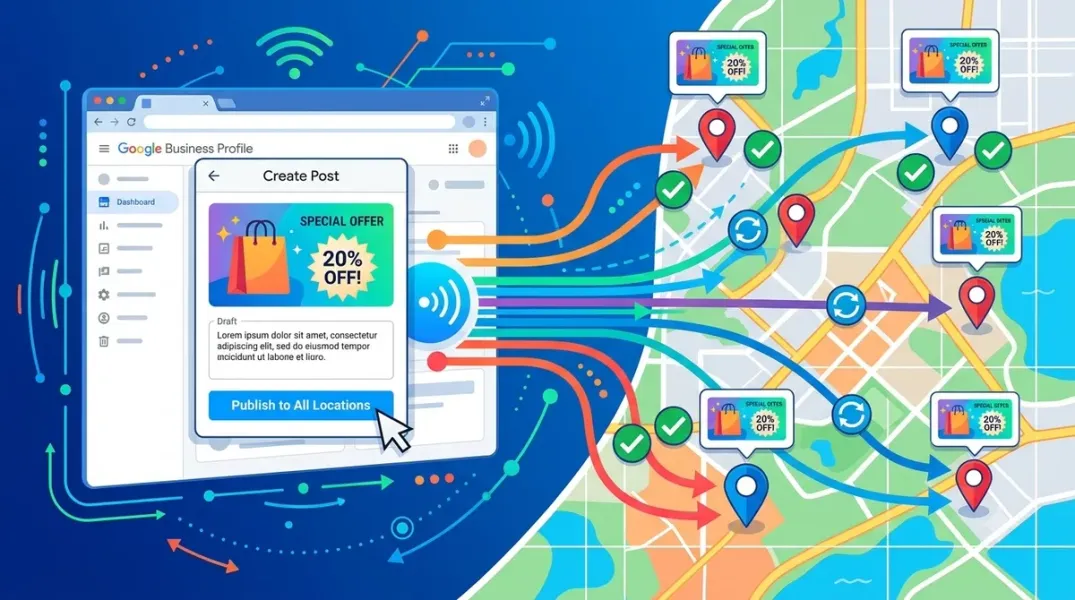
Publishing a Google Post to one location is a two-minute task. Publishing the same post to forty locations, with local relevance intact and without tripping Google’s spam filters, is an operational problem that most multi-location businesses solve badly—if they solve it at all.
The native interface has improved. Google now lets you copy a post to up to 20 locations in a single action, and it supports native scheduling and repeat publishing within the Business Profile dashboard. That is a genuine improvement for a small chain. It is not a solution for an estate of hundreds. The 20-location cap applies to the manual interface, and posting programmatically through the Business Profile API requires developer resources, approved quotas, and an understanding of limits that Google does not make optional.
Bulk Google Business Profile posting is therefore a question of matching the method to the scale. A five-location business can batch posts natively. A fifty-location franchise needs a master caption with local slots and a CSV workflow. A thousand-location network needs an API pipeline or an enterprise platform. This guide covers each tier, the limits that shape the choice, and the operating rules that keep bulk posting from becoming bulk spam.
The Native Ceiling: What Google Gives You for Free
Google’s native multi-location publishing is real and usable. When you create a post in Business Profile Manager, you can select multiple profiles, schedule the post for a future date and time, and set it to repeat. Google’s help documentation describes copying the same post across up to 20 locations in one action, choosing the profiles to share it to and then posting.
For a small chain with, say, eight or twelve locations, this is sufficient for a monthly batch. You write one post, select the locations, schedule it, and repeat the process for the next week’s post. The 20-location cap does not bite, and no third-party tool is required.
The cap becomes a bottleneck the moment your location count exceeds it. A brand with 40 locations already needs several passes through the interface to publish a single post everywhere; a brand with 800 cannot run its posting program by hand at all. The native feature closes the gap for a small group and exposes it for a large one.
The API is the bridge, but it comes with its own gates. Programmatic posting requires developer resources and an approved quota, and the API has historically restricted post publishing for accounts above certain location thresholds. One documented limitation states that Google’s API does not support post publishing for accounts with 10 or more locations as determined by internal chain detection, although this restriction has varied over time and across API versions. The practical implication is that the API is not a drop-in replacement for the manual interface at scale—it is a pipeline that has to be built, approved, and maintained.
The Store Code Is the Join Key (Fix It Before Anything Else)
The single most expensive mistake in bulk posting is a broken store code. Google will not let you change a store code by spreadsheet later, and the store code is the join key that connects every post, every location, and every reporting row in your workflow.
Before you publish a single bulk post, lock the store codes in a master sheet. Format the column as text so leading zeros survive, remove duplicates, and confirm that every location in the sheet matches a verified profile in Google Business Profile. A batch built on a broken store code will publish to the wrong locations or fail silently, and the failure is often invisible until a customer points out that the post under their local branch is advertising a different store’s promotion.
The same discipline applies to landing page URLs. Every location should link to its own store page, not the homepage. A bulk post that sends every location’s CTA to the same national homepage wastes the local relevance the post was supposed to create.
The Master Caption With Local Slots
The second rule of bulk posting is that identical content across locations is permitted but not recommended. HighLevel’s documentation states the position plainly: identical content is allowed, but location-specific tweaks are recommended to avoid perceived spam and to maximize local relevance. Google’s spam detection penalizes identical content across listings, which is why a healthcare agency automating posts across 1,000 locations deliberately generates a different post for every location, using the practice name, city, and services to vary the copy.
The operating fix is the master caption with local slots, the approach Sked Social recommends for multi-location teams. The master caption contains the fixed brand message and the CTA; the local slots hold the store name, a location-specific detail, a local landmark or neighborhood reference, and the store’s own landing page URL.
A workable master caption structure looks like this:
[Opening line tied to the season or offer]. At [Store Name] in [City/Neighborhood], we’re [local detail — the team, the location, the service available here]. [One sentence of brand message]. [CTA — Book, Learn More, Call].
The brand controls the opening, the message, and the CTA. The location supplies the name, the city, and the local detail. The result is a set of posts that read as locally written while staying inside brand guardrails.
The Three Tiers of Bulk Publishing
The right method depends on how many locations you manage and how much engineering resource you have.
Tier 1 — Native, under 20 locations. Use Business Profile Manager’s multi-location selection, native scheduling, and repeat publishing. Write one master caption per week, select the locations, and schedule the batch. This is the simplest workflow and requires no subscription. The limitation is that you cannot vary the caption per location within the native composer without editing each one, so if local relevance matters for every post, you will still be doing manual edits below the 20-location threshold.
Tier 2 — CSV bulk upload, 20 to a few hundred locations. This is where third-party tools earn their cost. Search Atlas shipped a full bulk CSV import UI for Google Posts in July 2026, with validation preview and results reporting, and its documentation describes the workflow as “significantly faster to schedule and publish posts across multiple locations at scale”. LocalClarity released a guided Bulk Post workflow in April 2026 for creating, customizing, previewing, and publishing posts across many locations at once, using the same multi-step experience as its bulk editing tools. Fedica accepts bulk uploads that drop a batch of updates into drafts, a pipeline, or the calendar, and lets you select a single shop, three of them, or the whole chain for one update. HighLevel’s GBP Post Scheduler is built for agencies and multi-location operators, with bulk-publish to multiple locations and built-in AI for copy and images.
The CSV workflow is the workhorse for mid-size chains. You write the master caption, export the location list with store codes and local slots, fill the CSV, upload it to the tool, review the validation preview, and schedule the batch. A partial failure is visible per row rather than silent across the whole batch.
Tier 3 — API pipeline or enterprise platform, hundreds to thousands of locations. At this scale, posting is a governance question, not a convenience feature. The Apify Local Business Posts API supports fan-out to up to 240 profiles in one call, with per-profile results so a partial failure is visible, and it is built for multi-location brands running the same weekly promotion across every store. The healthcare agency case study is the template for a custom pipeline: a Python application on Railway, a cron job running hourly, GPT-4 generating location-specific copy under 500 characters using the practice name, city, and services, and Yext publishing to Google Business Profile through an entity map of roughly 4,000 entities across 33 sub-accounts. The result was around 48 unique posts per run day across 62 brands and 1,000+ locations, with onboarding a new brand dropping from three hours to fifteen minutes.
The tier you choose should be the lowest one that removes your bottleneck. Do not build an API pipeline for twelve locations. Do not run a 200-location chain through the native interface with twenty passes per post.
The Workflow That Keeps Bulk Posting From Becoming Bulk Spam
Bulk publishing fails in two directions: it either sounds identical everywhere, or it publishes without approval and something off-brand goes live across the estate. The workflow that avoids both has five steps.
Step 1 — Lock the master sheet. Store codes, location names, cities, local details, landing page URLs, and the Google profile ID for every location. Refresh it when locations open or close.
Step 2 — Write the master caption with bracketed slots. One caption per week or per campaign. The slots are the only thing that changes per location.
Step 3 — Generate the CSV and validate. Fill the slots from the master sheet, upload the CSV, and use the tool’s validation preview to catch missing fields, broken URLs, and image-size errors before publishing. The API enforces a 5 MB maximum file size for post images, and images should be at least 250 × 250 pixels with a 1200 × 900 target for best display.
Step 4 — Run an approval gate. For anything below five stars or tied to a regulated category, the post should route to a human before it publishes. HighLevel and Fedica both support approval workflows and drafts, and Sked Social provides approvals on its Accelerate and Custom plans so head office can sign off before a store publishes. The approval gate is not a bottleneck if it is applied by risk: routine seasonal updates can auto-publish; promotions with legal or pricing implications go through review.
Step 5 — Verify and measure. After the batch publishes, confirm that each post is live and that Offers and Events carry the correct date ranges. Then measure performance per location—views and CTA clicks through GBP Insights—rather than only at the brand level. The Crate and Barrel case study is the benchmark worth keeping in view: adding Google Posts produced a 31% increase in Google Map Views and a 6% increase in Google Search Views.
Conclusion
Efficient bulk Google Business Profile posting is not a single tool or a single trick. It is a scale-matched workflow: native multi-location publishing below twenty locations, a CSV bulk-upload tool from twenty to a few hundred, and an API pipeline or enterprise platform beyond that. The 20-location native cap is the line that separates the first tier from the second, and the API’s approval and quota requirements are the line that separates the second from the third.
The rules that matter are consistent across every tier. Fix the store code before you publish anything, because Google will not let you change it later. Build a master caption with local slots so twenty-five stores do not publish twenty-five identical posts. Run a validation preview before the batch goes out, and apply an approval gate by risk rather than uniformly. And measure per location, because a group-wide average hides the branches that are actually falling behind.
The healthcare agency that automated posts across 1,000+ locations did not start with an API pipeline. It started with a manual process that did not scale, then built the narrowest system that removed the bottleneck. That is the sequence to copy: find the cap you are hitting, and move one tier up—not three.
Call to Action
Audit your location count and your store codes this week. If you manage under twenty locations, test the native multi-location selection and scheduling in Business Profile Manager—you may not need a paid tool yet. If you manage more than twenty, open your master sheet and confirm that every store code is unique, formatted as text, and matched to a verified profile. Then write one master caption with bracketed local slots, fill a CSV for a single week’s batch, and run it through a tool with a validation preview before you schedule the full month. If you are evaluating tools, shortlist by the feature that matches your tier: native scheduling under twenty, CSV bulk import and approval workflows from twenty to a few hundred, and API fan-out or an enterprise platform beyond that.
FAQs
How many Google Business Profile locations can I post to at once natively?Google’s native interface allows copying a post to up to 20 locations in a single action, and it supports native scheduling and repeat publishing within the Business Profile dashboard. The 20-location cap applies to the manual interface; posting programmatically through the API requires developer resources and approved quotas.
Is there a limit on how many locations can use the Google Business Profile API for posting?The API has historically restricted post publishing for accounts above certain location thresholds, with one documented limitation stating that accounts with 10 or more locations may not have API post publishing support depending on internal chain detection. The restriction has varied across API versions and time, so verify the current quota and eligibility before building a pipeline.
Can I publish identical posts across all locations?Identical content is permitted, but location-specific tweaks are recommended to avoid perceived spam and to maximize local relevance. Google’s spam detection penalizes identical content across listings, and the proven approach is a master caption with local slots—store name, city, local detail, and the store’s own landing page URL—so each post reads as locally written without requiring a separate writing session.
What is the best tool for bulk Google Business Profile posting?It depends on scale. HighLevel, LocalClarity, Search Atlas, and Fedica support bulk publishing, CSV import, scheduling, and approval workflows for multi-location teams. For hundreds or thousands of locations, an API pipeline such as the Apify Local Business Posts API (fan-out to up to 240 profiles per call) or a custom build on the Business Profile API is the practical route.
Why is the store code so important in bulk posting?The store code is the join key that connects posts, locations, and reporting rows. Google will not let you change a store code by spreadsheet later, so a broken or duplicated store code can cause posts to publish to the wrong locations or fail silently. Lock the codes in a master sheet, format the column as text, and remove duplicates before the first bulk upload.
How do I keep bulk posts from sounding identical across locations?Use a master caption with bracketed local slots: the brand controls the opening, message, and CTA, while each location supplies its name, city, a local detail, and its own landing page URL. The healthcare agency that posts across 1,000+ locations generates a different post for every location using the practice name, city, and services, and blocks specific claims outright to keep the copy compliant.
What image specifications apply to bulk Google Business Profile posts?Images should be JPEG or PNG, at least 250 × 250 pixels, with a 1200 × 900 target for best display and a 5 MB maximum file size. The API enforces the 5 MB limit, and oversized images are a common cause of failed bulk posts.
Internal & External Links
Internal links (to other posts in this series):
- How to Plan Google Business Profile Content Around Seasonal Promotions (previous post)
- How to Choose the Right Call-to-Action for Google Business Profile Posts (next in series)
- How to Schedule a Month of Google Business Posts in One Sitting
- How to Manage Google Business Profiles for Multiple Clients Without Account Chaos
- How to Standardize Local Marketing Tasks Across a Distributed Team
- How to Create a Consistent AI Brand Voice for Every Business Location
- How to Manage Google Reviews From Multiple Locations in One Dashboard
External links (sources referenced in this article):
- PinMeTo — Google Posts adds scheduling and multi-location publishing: https://www.pinmeto.com/news/google-posts-multi-location-scheduling-2026/
- Sked Social — How to manage Google Business Profile for multiple locations in 2026: https://skedsocial.com/blog/manage-google-business-profile-multiple-locations
- HighLevel — Google Business Profile (GBP) Post Scheduler: https://gohighlevelassist.freshdesk.com/support/solutions/articles/155000007212-google-business-profile-gbp-post-scheduler-in-highlevel
- Search Atlas — Updates: Local & GBP Updates (July 2026 bulk CSV post import): https://help.searchatlas.com/hc/searchatlas-help/en/categories/start-here-and-resources—updates-local-and-gbp-updates
- LocalClarity — Release notes: Bulk Posts, Built for Scale: https://www.localclarity.com
- Fedica — Schedule Google Business Posts: https://fedica.com/google-business/scheduler
- Apify — Local Business Posts API: https://apify.com/listingsapi/local-business-posts-api
- Islands — How a healthcare agency automated Google posts across 1,000 locations: https://www.islandshq.xyz/case-studies/strategy-collective
- PinMeTo — Google Business Profile Best Practices: The 2026 Playbook: https://www.pinmeto.com/blog/google-business-profile-best-practices-2026/
- StoryChief Help Center — Google Business Profile: Local Post disabled (API location limitation): https://help.storychief.io
- eclincher Help — My Post Failed or Didn’t Publish on Google Business Profile (multi-location limitation): https://eclincher.crisp.help
How to Choose the Right Call-to-Action for Google Business Profile Posts
Grow Your Google Maps Ranking on Autopilot
Stop spending hours every week manually replying to customer reviews and writing Google posts. Busirank automates your Google Business Profile to boost your local SEO rankings and turn searchers into paying clients.
 Busirank Team