 Busirank Team
Introduction
Seasonal promotions are the easiest content a local business will ever have to write. The offer already exists, the audience already cares, and the timing is set by the calendar. Yet most businesses still publish their holiday post after the holiday, their “beat the heat” offer in the middle of a heat wave when every competitor is already booked, and their back-to-school promotion the week move-ins are already happening.
The gap is not creativity. It is timing and structure—and both are solved by a Google Business Profile content calendar that maps seasonal demand to publish dates before the season arrives.
Seasonality in local search is not a soft concept. Most local categories show 30–80% swings in monthly search volume, and customers start searching for seasonal services two to four weeks before peak demand. The businesses that capture those swings are the ones whose seasonal content is already live when demand climbs—not the ones writing it while the phone rings. This guide covers how to build that calendar, what to schedule around, and how to keep it running without a marketing department.
Why Seasonal Planning Beats Seasonal Reacting
The core problem with reactive seasonal posting is not that the content is bad. It is that the window has already closed. A Fourth of July special published two weeks after the Fourth does not read as “close enough”—it reads as evidence that nobody is paying attention to the profile.
There is a second cost that is less visible: Google takes time to index and rank seasonal content. One 2026 analysis puts the indexing lag at one to two weeks for seasonal posts and offers, which is why the recommended lead time for seasonal GBP content is 30–45 days. Another practitioner frames it more simply: post two to four weeks ahead of when search demand typically starts climbing in your area.
And there is a compounding cost. Profiles that update at least monthly receive roughly 70% more profile views than those updated quarterly or less. Google’s local systems have also been observed weighting recency of profile activity more aggressively, with profiles that ship no Post, photo, or category tweak for 90 days visibly losing ground to competitors doing weekly maintenance. Seasonal planning is how a business stays in the active set without inventing content from scratch.
Step 1: Map Your Seasonal Moments (Not the Generic List)
Before you build a calendar, you need the specific list of moments that matter for your business, your customers, and your geography. Generic holiday lists are worse than useless because they pull attention toward dates that do not drive demand for you.
The 2026 planning guides converge on three categories worth mapping:
- Weather-driven moments — storm season, first cold snap, first heat wave, hurricane prep window.
- Calendar-driven moments — back to school, holidays, tax season, spring cleaning, summer travel.
- Industry-specific moments — whatever spikes demand in your particular trade. A roofer cares about storm season differently than a landscaper does.
There is a fourth category that often gets missed and usually has the least competition: smaller local moments—a first cold snap, a local festival, a permit deadline. A business that owns the “first cold snap” conversation in its town often gets more attention than one competing for attention on Black Friday.
Write these down. The act of writing is the planning.
Step 2: Work Backward From the Search Window
Once the moments are mapped, the timing rule is mechanical: find when people actually start searching, and publish before that date—not on it.
The standard lead time is two to four weeks before search demand starts climbing. The more conservative planning window is 30–45 days, which accounts for Google’s indexing lag and the fact that customers begin researching seasonal services two to four weeks before peak.
The AC repair example makes this concrete. The smart move is not a “beat the heat” post dropped in the middle of a July heat wave when every competitor is already slammed. It is the same post going live in late April, before anyone is sweating, so the business is the name already in front of people when the first real heat wave hits. The same logic applies to a moving company posting in early July for August lease turnovers, because families planning a move typically start calling three to four weeks before their lease date.
For each seasonal moment on your list, write two dates: the date search demand starts climbing, and the publish date, which is two to four weeks earlier.
Step 3: Match the Post Type to the Lifespan You Need
This is the step most seasonal calendars get wrong, and it determines whether your promotion survives the week. The post type controls how long the content stays prominent, and the difference is not small.
Update posts—the standard “What’s New” format—stay prominent for roughly seven days, then move to the Updates archive. Offer posts and Event posts remain visible until the end date you set, and Google archives them when the promotion or event ends.
The practical rule for a seasonal calendar is therefore:
- Anything with a natural end date—a holiday sale, a seasonal menu, a limited-time package, a workshop, a seasonal event—must be scheduled as an Offer or an Event with a date range, not as an Update.
- Anything without an end date—a seasonal service spotlight, a “book early” reminder, a seasonal photo roundup—goes out as an Update and needs a weekly slot to stay visible.
This single decision triples the lifespan of a seasonal promotion for free. A two-week holiday offer published as an Offer holds its prominent spot for two full weeks; the same words published as an Update start fading in seven days.
Step 4: Build the Calendar on Quarterly Themes With Monthly Specifics
A seasonal calendar does not need to be a work of art. It needs to be structured enough to remove decisions and flexible enough to absorb reality. The 2026 planning frameworks converge on a quarterly theme with monthly specifics structure, which is coarse enough to plan in advance and fine enough to execute week by week.
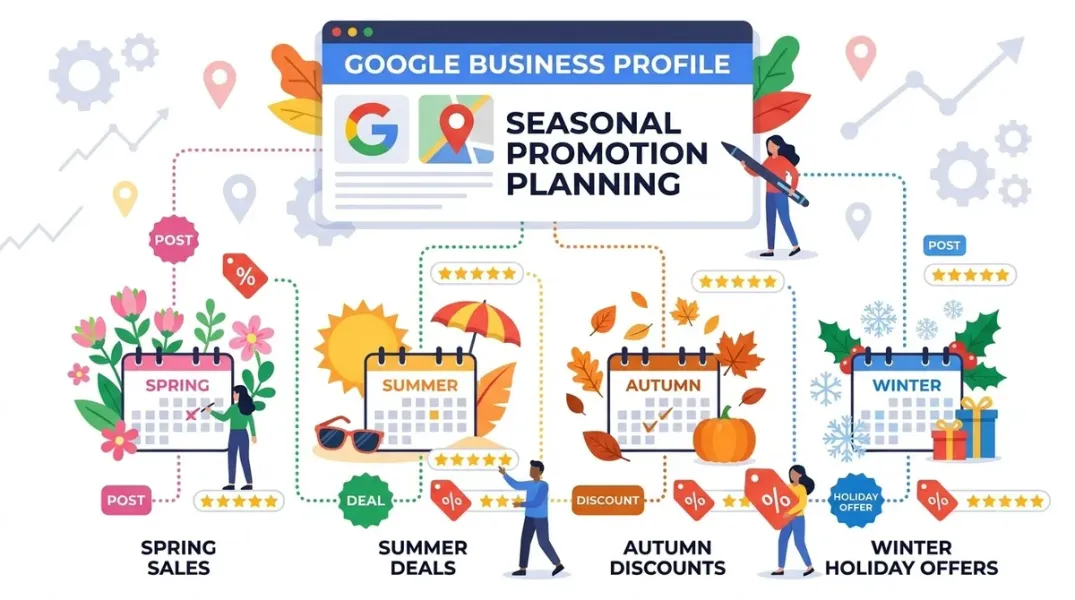
A workable Q1–Q4 frame for a local business:
Q1 (January–March) — the planning quarter. Themes: new year, annual checkup, tax season, winter maintenance. Post once per week: kickoff offers, free consultations, year-ahead tips. Review push: ask everyone served in November and December. Offer: January savings or a Q1 booking discount.
Q2 (April–June) — the demand-spike quarter. Themes: spring cleaning, AC tune-up, graduation, Mother’s Day, summer prep. Post twice per week: service spotlights tied to spring and summer. Review push: right after each completed seasonal job. Offer: bundle deals.
Q3 (July–September) — the conversion quarter. Themes: back to school, fall prep, emergency cooling, Labor Day specials. Post twice per week: urgency offers and “book before fall” CTAs. Review push: daily for 30 days right after the summer peak. Offer: end-of-summer service packages.
Q4 (October–December) — the trust quarter. Themes: holiday hours, winter prep, gift cards, year-end specials. Post twice per week: holiday hours, community involvement, year-in-review. Review push: include in every invoice and follow-up. Offer: gift cards plus early-bird Q1 booking discounts.
The monthly layer adds the specifics. The month-by-month planning guides fill in the detail: January is “new year, new you” offers; February is Valentine’s and appreciation, with the offer planned by late January; April is spring cleaning and before-and-after results; May is Mother’s Day, graduations, and weddings; June is summer hours and the year’s best review-collection stretch so far; August is back to school; October is early gift ideas and holiday-hours planning; November is Small Business Saturday and Black Friday; December is gift cards, last-minute reminders, and genuine gratitude.
One structure that keeps the calendar from becoming a blank page is a weekly content rotation layered on top of the seasonal theme: week 1 service spotlight, week 2 customer success story, week 3 educational tip, week 4 offer or event. The seasonal theme decides which service and which offer; the rotation decides what kind of post.
Step 5: Do Not Let the Profile Break During the Season
Seasonal promotions do not live in the Posts tab alone. The parts of the profile that change with the season have to change on the same schedule, and the most expensive seasonal mistake in local search is wrong holiday hours.
Google’s own guidance is specific: instead of just saying “Closed,” specify “Closed for Thanksgiving” or “Christmas Day Hours,” and double-check the dates. If you are extending hours for the busy season, change your normal weekly schedule in addition to your special holiday hours—Google keeps regular weekly hours separate from Special hours, and Special hours apply to a specific date such as a holiday.
The seasonal checklist that runs alongside the post calendar includes:
- Special hours set for every modified day, including extended hours and not just closures.
- Seasonal photos refreshed—real, geo-tagged images of the season’s work, products, and storefront outperform stock photos by a wide margin.
- Attributes updated for the season where relevant, such as outdoor seating, holiday market proximity, or seasonal amenities.
- A recurring post highlighting schedule changes, published two weeks before the change takes effect.
A 2026 GBP strategy guide puts the holiday post cadence plainly: rather than one November post, plan a few posts across the season—one in late October about booking early, one in mid-November about the main offer, and one in December about last-minute availability. That cadence keeps the profile current through the busiest weeks.
Step 6: Batch the Work and Reuse the Templates
The reason seasonal calendars die is that they require decisions during the busiest weeks. The fix is batch creation ahead of the season and templates that survive to next year.
The batching habit is well established: set aside a session each month to write all copy for the upcoming two to four weeks, gather the images in a single session, and schedule everything in advance. For seasonal work, the batch should happen before the season starts, not during it. The holiday-window photos, for example, should be shot in September so they are ready to run all season.
The reuse habit is what makes year two easy. Most seasonal moments repeat on roughly the same schedule every year. Once a solid post is written for a moment, save it as a template; next year, pull it, swap in the current dates and offer, and you are done in minutes. The two rules that keep reuse from becoming staleness: refresh the wording, and never leave last year’s price in a recycled offer—nothing kills trust faster than yesterday’s pricing on today’s promotion.
The Tools That Make Seasonal Scheduling Practical
Google has added native scheduling for updates, offers, and events, and it supports selecting multiple profiles for one post and repeating the schedule. A single-location business can run a seasonal batch natively. Multi-location networks and agencies still need dedicated tools for bulk publishing, per-location customization, and approvals.
The 2026 tool landscape for seasonal batching includes HighLevel’s GBP Post Scheduler, which supports scheduling in advance, bulk-publishing to multiple locations, and built-in AI for creative work. GMBapi is built for seasonal service menus across large location counts, with advance scheduling for specific dates across multiple listings. Local Falcon’s Falcon Agent can schedule recurring posts and accepts the post type and message style as inputs, including seasonal updates. SocialPilot documents both the native scheduler and third-party scheduling, with a recommended batching cadence of 8–12 posts per month created in one session.
The tool decision is secondary to the calendar. Pick the scheduler that matches your location count, and spend the saved time on the part that actually matters: knowing when your customers start searching, and being live before that date.
Conclusion
Planning Google Business Profile content around seasonal promotions is a timing discipline, not a content problem. The businesses that win seasonal demand are not writing better holiday posts—they are publishing them four weeks earlier, choosing the post type that keeps the offer visible for its full run, and updating the hours and photos on the same schedule.
The four decisions that make a seasonal calendar work are: map the moments that actually drive your demand, work backward two to four weeks from the search window, use Offer and Event posts for anything with an end date, and batch the work before the season starts. Layer those on top of weekly posting and monthly profile checks, and the calendar runs without competing with the busy season.
The uncomfortable truth is that most local profiles post less than once per quarter while pack leaders average 1.4 posts per week. A seasonal calendar is how a business closes that gap without hiring anyone—by deciding in January what October will say.
Call to Action
Build the seasonal moment list this week, before you build the calendar. Write down the three seasonal moments that drive the most demand for your business—not the generic holiday list, the ones your booking history confirms. For each one, write the date search demand starts climbing and a publish date two to four weeks earlier. Then open your scheduler and create the first post as an Offer or Event with a date range if it has an end date, and an Update if it does not. Save the copy as a template so next year takes five minutes. If you manage multiple locations, batch the whole season in one session and use a bulk scheduler rather than publishing location by location.
FAQs
How far in advance should I plan seasonal Google Business Profile content?Plan 30–45 days ahead for seasonal posts and offers, because Google takes one to two weeks to fully index seasonal content and customers start searching two to four weeks before peak demand. A simpler working rule is to publish two to four weeks before search demand starts climbing in your area. Map the major holidays and seasonal promotions one to three months in advance so you have time to create quality content and coordinate with promotions.
Should seasonal promotions be Offer posts or Update posts?If the promotion has an end date—a holiday sale, a seasonal menu, a limited-time package—use an Offer or Event post with a date range. Update posts stay prominent for about seven days, while Offer and Event posts remain visible until the end date you set. Using an Update for a two-week promotion cuts its prominent lifespan by more than half.
How often should I post to Google Business Profile during a seasonal push?The baseline is once per week year-round, because Update posts expire after about seven days. During a demand-spike or holiday quarter, twice per week is the common cadence in 2026 planning frameworks, with a mix of service spotlights, urgency offers, and schedule updates. For restaurants and retail with daily specials, daily posting can be appropriate.
What seasonal profile updates matter beyond posts?Special hours are the highest-stakes item: set them for every modified day, specify the holiday by name, and update regular weekly hours separately if the season changes your schedule. Also refresh seasonal photos (real, geo-tagged images outperform stock), update seasonal attributes, and publish a schedule-change post two weeks before the change takes effect.
Can I reuse last year’s seasonal posts?Yes, and you should. Most seasonal moments repeat on roughly the same schedule, so saving a solid post as a template and swapping in the current dates and offer turns next year’s work into a five-minute task. Two rules: refresh the wording so it does not read as stale, and never leave last year’s price in a recycled offer.
Do I need a tool, or can I schedule seasonally in Google’s native interface?Google now supports native scheduling for updates, offers, and events, and it can publish one post to multiple profiles and repeat the schedule. A single-location business can run a seasonal batch natively. Multi-location networks and agencies typically need a third-party tool for bulk publishing, per-location customization, and approval workflows.
What is the biggest seasonal planning mistake?Posting the day of the event instead of weeks before. By the time the season is obvious to you, search volume has already peaked and started sliding; a post that shows up after the window closes reads as an afterthought and signals that the profile is not actively managed. The second biggest mistake is wrong holiday hours, which sends ready-to-buy customers to a closed door.
Internal & External Links
Internal links (to other posts in this series):
- How to Schedule a Month of Google Business Posts in One Sitting (previous post)
- How to Publish Google Posts Across Multiple Business Locations Efficiently (next in series)
- How to Choose the Right Call-to-Action for Google Business Profile Posts
- How to Create a Consistent AI Brand Voice for Every Business Location
- How to Plan Google Business Profile Content Around Seasonal Promotions
- Best Google Business Profile Management Software for Small Businesses in 2026
External links (sources referenced in this article):
- LocaFy — Google Business Profile Posts: Best Practices and Examples: https://www.locafy.com/blog/gbp-posts-guide
- GMBMantra — Local SEO Content Calendar: Plan, Schedule, and Automate Your GBP Posts: https://gmbmantra.ai/local-seo-automation/content-calendar
- ReplyOnTheFly — Local Business Marketing Calendar: Your Month-by-Month Plan: https://www.replyonthefly.com/blog/local-business-marketing-calendar
- Rocket Web Designer — Seasonal Google Posts: Timing Them Right: https://rocketwebdesigner.com/blog/seasonal-google-posts-timing-them-right
- LocalBoostly — Local SEO Seasonality Calendar 2026: Quarterly GBP Plan: https://localboostly.co/blog/local-seo-seasonality-calendar-2026
- SocialPilot — How to Schedule Google Business Profile Posts [2026 Guide]: https://www.socialpilot.co/blog/how-to-schedule-google-business-profile-posts
- Synoveo — Seasonal Google Business Profile Optimization for Hotels: https://synoveo.com/blog/seasonal-google-business-profile-optimization-hotels
- Flento — Local SEO Content Calendar (2026): https://www.flento.io/blog/local-seo-content-calendar-12-month-guide
- Digital Marketing Expert Team — Local SEO Content Calendar Template: The Complete Planning System for 2026: https://digitalmarketingexpertteam.com/local-seo-content-calendar-template/
- Google Support — Google Small Business Bulletin: Fall and Beyond: https://support.google.com
- LocaFy — How to Update Your Google Business Profile Hours for Holidays: https://locafy.com
- HighLevel — Google Business Profile Post Scheduler: https://gohighlevelassist.freshdesk.com
- GMBapi — Fresh, Hyperlocal Content. In Bulk.: https://gmbapi.com
- Local Falcon — Knowledge Base: Automating GBP Posts via Falcon Agent: https://www.localfalcon.com
How to Publish Google Posts Across Multiple Business Locations Efficiently
Grow Your Google Maps Ranking on Autopilot
Stop spending hours every week manually replying to customer reviews and writing Google posts. Busirank automates your Google Business Profile to boost your local SEO rankings and turn searchers into paying clients.
 Busirank Team