 Busirank Team
Introduction
A single-location business can check Google reviews once a day and reply in a few minutes. That approach does not survive a second location. Ten locations do not mean ten times the reviews on any given day, but they do mean ten separate streams to monitor, ten logins to remember, and ten different managers who may or may not be checking. By the time a regional chain reaches twenty-five locations, review response stops being a task and becomes a queue—and response time is the first quality metric to slip, and the easiest for a customer to notice.
The cost of that slip is not contained to the location where it happens. 91 percent of consumers say the reviews at an individual branch shape how they see the entire brand. One under-managed location drags down perception of every other location you run. And Google’s local algorithm in 2026 still weights review count, review recency, and response rate as ranking signals for the local pack, which means inconsistent response habits across branches make a multi-location group functionally compete against itself.
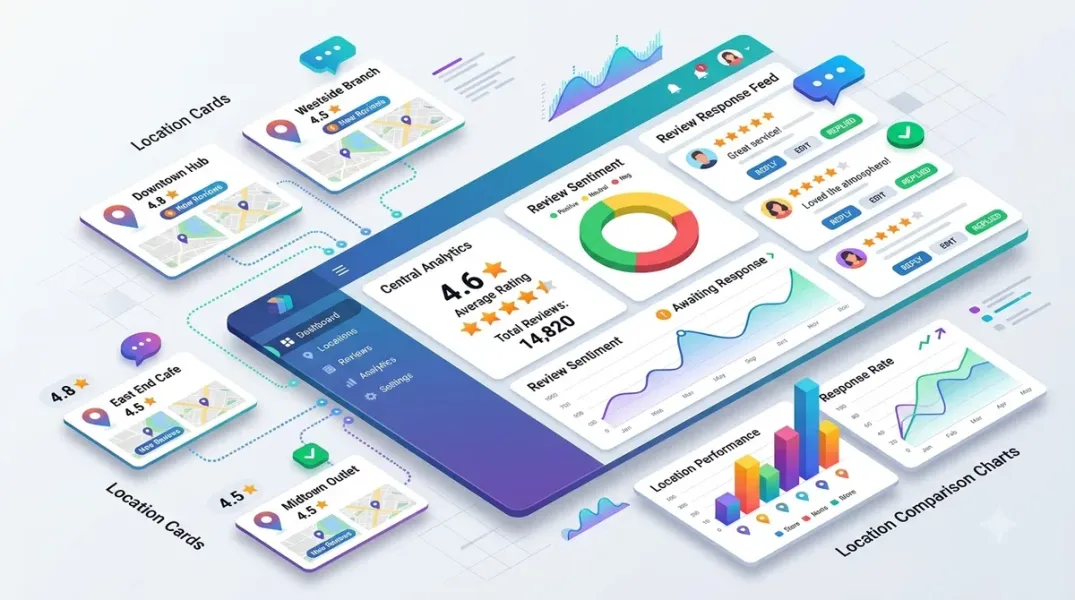
Multi-location review management is the operating discipline that fixes this: monitoring and responding to reviews across every location from one centralized system, not location by location. This guide covers how to build that system, what the dashboard must actually do, and how real operators have cut response times to under 16 hours across dozens of locations.
What Multi-Location Review Management Actually Means
The definition is deceptively simple. Vendasta puts it plainly: multi-location review management means monitoring and responding to reviews across every location from one dashboard, not logging into each profile separately. It covers Google, Facebook, Yelp, and any industry-specific platform your locations appear on—broader than Google Business Profile management, even though that is where most of the conversation focuses.
What separates it from single-location management is not just volume. It is three structural problems that a single-location workflow never encounters.
Ownership gets complicated. Who replies to a review at Location 12? The local manager, a regional lead, or head office? Multi-location businesses need an actual answer to that question, not an assumption that someone is watching.
Tone has to work at two levels. Responses need to sound consistent with the brand while still feeling specific to that location and that customer.
Reporting needs both a zoomed-out and zoomed-in view. You need to know how the brand is doing overall and which individual locations are pulling that average up or down.
The pain is concrete and familiar. Five locations means five Google Business logins to check. Twenty locations means reviews slip through the cracks. Fifty-plus locations means hours spent pulling spreadsheets together when leadership asks how the brand is doing. The centralized dashboard exists to collapse those separate streams into one operational surface.
Why the Dashboard Alone Is Not the Fix
Here is the uncomfortable truth that most tool comparisons skip: a dashboard is a monitoring surface, not a management system. It was built to report the problem, not to solve it.
The failure mode is predictable. Reviews across all locations flow into one view. A low-rated branch gets flagged. The alert goes to a regional manager who is already managing twelve other priorities. A templated reply goes out. The score stays at 3.6, and head office asks the same question next quarter.
The reason is that review inconsistency is usually an operational readout, not a reputation problem. Two clinics running the same brand standards manual, the same intake forms, and the same review-request tool can sit at 4.8 stars and 3.6 stars because they are delivering two different experiences—different waits, different front-desk warmth, a new hire still learning the system. The dashboard can show you the 3.6. It cannot shorten the wait or retrain the hire.
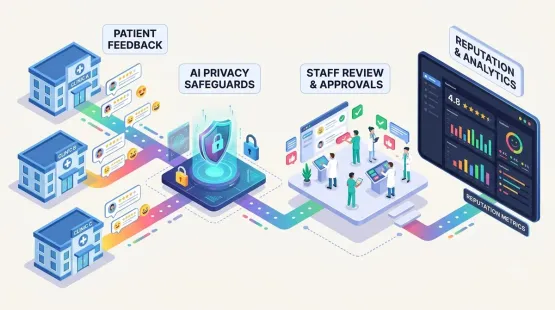
So the dashboard is necessary but insufficient. What makes multi-location review management work is the routing and ownership layer on top of it: feedback has to reach the person who can act on it, and ownership of the score has to sit at the location, with the frontline employee who can fix the problem before the next customer walks in.
Step 1: Centralize Every Location Before You Touch Response Strategy
The first move is structural, not strategic. Pull every location’s listings into one dashboard before you design a response workflow.
This step surfaces problems that were invisible in the location-by-location approach. Multi-location groups routinely discover during the audit that two or three locations have duplicate or unclaimed listings splitting their review volume in half. A location with 40 reviews split across two profiles looks weaker than one with 40 reviews on a single verified listing—and fixing duplicates before anything else is the priority.
The audit should capture, for every location: current review count, average rating, and last-response date across Google Business Profile and any other platform the location appears on. Claim and verify every profile. Unverified profiles can be edited by anyone, and groups frequently find outdated phone numbers or wrong addresses live on listings from years earlier. Batch verification rather than trickling it out; the process typically takes 5–7 business days per location through postcard or phone confirmation.
Only after every location is verified and deduplicated does the dashboard become a reliable single source of truth.
Step 2: Set Response Rules by Rating and Urgency
The second decision determines whether the dashboard becomes a fast lane or a bottleneck. Decide in advance what gets an automated reply and what requires a human.
The practitioner consensus has converged on a tiered split. Vendasta describes the common and effective model: automate replies to five-star reviews, and route anything below that to a person for a personalized response. The 43-location dealership case study applies exactly this split—automated five-star responses across all locations, with AI-generated suggestions for the reviews that need human judgment.
A more granular tiering adds urgency to the rating logic. A hospital-group protocol splits response tracks into operational complaints (wait times, billing, parking, staff behavior), which get a public apology plus an offline resolution path, and clinical complaints (treatment outcomes, diagnosis disagreements, doctor-specific issues), which get a short, non-defensive public acknowledgment and immediate escalation to the medical superintendent—never a public debate about a diagnosis.
For most multi-location businesses, a workable policy is:
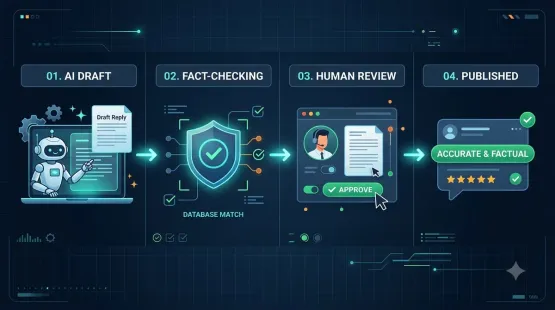
- 5-star with text: AI draft → auto-publish or one-click approve.
- 4-star with text: AI draft → quick human approval, with a weekly sample audit.
- 1–3 star, any text: AI draft → mandatory human approval, no exceptions.
- Sensitive keywords (safety, legal, medical, refund, staff conduct): route to a named escalation owner immediately; never auto-publish.
The alert layer matters as much as the reply layer. Set alert thresholds so any review under 3 stars triggers an immediate notification to both the location owner and the central reviewer. Done correctly, average response time across the group should drop from days to under 24 hours within the first two weeks of setup.
Step 3: Assign Ownership at Two Levels
The dashboard fails when everyone can see everything and no one owns anything. Multi-location operations need one accountable owner per location, plus one central reviewer for escalations.
This maps to a two-tier structure that the tooling now supports directly. Delegated user permissions let local managers handle their own location’s reviews and see their own metrics, while HQ keeps brand consistency and centralized reporting. Cinquo’s delegated-user model is built for exactly this: local teams operate within boundaries, and head office retains oversight.
The division of labor is not “head office approves everything.” Head office’s value is in spotting patterns that a single location manager cannot see from inside their own building. A single three-star review at one clinic is a local issue—the branch manager handles it. Three locations in the same region dropping half a star in the same month is a regional issue, and only head office is positioned to catch it.
That pattern-detection responsibility is the argument for the dashboard in the first place. One complaint about wait times might be a one-off. The same complaint showing up at six locations is an operational issue worth fixing. The dashboard’s job is to surface that pattern; the ownership structure’s job is to act on it.
Step 4: Standardize Voice, Localize Details
The voice problem at multi-location scale is not “sounding too corporate.” It is sounding identical—the same response under every branch, which tells customers nobody at the local level is listening.
The operating principle is to keep tone, brand promise, and core response structure consistent everywhere, while letting local specifics vary—a team member’s name, a location-specific detail, a reference to the actual visit.
Practically, this means building a brand voice reference (uploaded marketing copy, best manually written replies, brand guidelines) and a set of guardrails that enforce the non-negotiables: banned opening phrases, banned vocabulary, a length limit, and a rule to reference one concrete detail from the review. Then allow per-location variables to flow into the draft. The AI drafts in the brand voice; the local detail makes it feel like that branch wrote it.
For teams that want tighter control, approval workflows can be scoped by location: local managers draft, HQ approvers review sensitive replies, and the system enforces the “never auto-publish this category” rules rather than relying on memory.
Step 5: Measure Response Time, Coverage, and Velocity—Not Just Star Rating
The metrics that matter at multi-location scale are different from the ones a single-location owner tracks. A group-wide average rating hides exactly the locations that need attention, so the reporting layer must break out per-location performance.
The dashboard should track four metrics per location, reviewed monthly rather than quarterly:
Response time — the benchmark is 24–48 hours for routine reviews, with faster handling for negative reviews. The 43-location dealership maintains an average response window of 6 to 16 hours across all locations after automating five-star replies. Consumer expectations support the target: BrightLocal’s 2026 survey found 19 percent expect a same-day reply and 32 percent expect one by the next day.
Response coverage — the percentage of reviews that receive any reply. A default operating target is coverage at or above 90 percent, with a median response inside 48 hours over a 30–45 day window.
Review velocity — new reviews per month per location. For multi-location eye care networks in 2026, capturing 4 to 8 reviews per location per month is the target that correlates with top-3 local pack visibility; networks below 1–2 reviews per location per month typically lose ranking to single-location competitors with active programs.
Rating trend — the 30-day rolling average per location. A location losing 0.2 stars over three consecutive months is an early warning sign worth a site visit before it shows up in a board report.
Review these monthly. Quarterly is too slow to stop a pattern from forming; by the time the report goes out, the same issue has already repeated and become a trend line.
The Tools That Actually Support This Workflow
When evaluating multi-location review management software, the differentiator is not the length of the feature list. It is whether the platform supports centralized monitoring, configurable automation rules by star rating, a human-in-the-loop workflow, and reporting at both brand and location level.
Birdeye is purpose-built for multi-location brands, with AI agents positioned at every location, review monitoring across 200+ sites, AI-powered response suggestions, and location-band pricing (1–3, 4–9, 10–39, 40–249, 250–999, 1000+ locations). Pricing is quote-driven, with reported starting points around 299 per month.
Podium runs from $399/month (Core) to $599/month (Pro), with advanced multi-location management reserved for the Signature tier. Pricing is per location, so ten sites means ten subscriptions—a cost structure that makes sense for some operating models and not others.
Vendasta’s AI Reputation Specialist is the tool behind the 43-location case study: automated five-star responses, AI-generated suggestions for human review, and a centralized dashboard across every location. The reported results are a 6–16 hour average response time and several hours per week returned to the marketing team.
Zoho Publish, Cinquo, RecurPost, and Sked approach the problem from the scheduling-and-inbox side, collapsing multiple Google Business Profiles into one queue with per-location tags, filters, and time zones. These are practical for teams whose primary need is a unified inbox rather than deep reputation analytics.
SmartSurvey’s Reputation Management module (launched February 2026) connects Google Business and Trustpilot profiles into one dashboard with AI-powered sentiment and thematic tagging, so recurring issues surface without manual coding. LocalClarity adds five dashboard charts specifically for review score evaluation across locations, including Response Time and Comment Ratio.
The pricing spread is wide, from Synup at $79/month for a white-labeled agency OS to enterprise contracts quoted per location band. The right tier depends on whether you need a focused review-approval tool, a full local marketing suite, or an agency-grade white-label platform.
The Realistic Rollout Sequence
The 43-location dealership did not automate everything on day one. The sequence was: centralize every location’s reviews in one dashboard, automate the five-star responses that required no judgment, generate AI suggestions for everything else, and keep a human on the reviews that needed one. The result was not “zero human involvement.” It was “human involvement only where judgment adds value”—and a response window that dropped to single-digit hours.
That is the implementation model to copy. Centralize first. Set the response rules by risk. Assign ownership at both levels. Automate the safest tier. Measure response time, coverage, velocity, and trend per location—monthly. Loosen automation only when the drafts consistently sound like the brand and the approval queue is a glance rather than a rewrite.
Conclusion
Managing Google reviews from multiple locations in one dashboard is not a software purchase. It is an operating redesign. The dashboard removes the toggling between logins, but the results come from the rules layered on top: which reviews move automatically, who owns which location, how fast a sensitive review reaches a human, and how you measure whether any of it is working.
The data makes the case for doing this properly. 91 percent of consumers let a single branch’s reviews shape their view of the whole brand. Review recency and response rate are weighted ranking signals in local search. And the operators who have built the centralized, tiered, human-in-the-loop workflow are hitting 6–16 hour response times across 43 locations while reclaiming hours of marketing time each week.
The locations that stay at 3.6 while their sister sites sit at 4.8 are not a reputation problem to be managed from the top down. They are an operational signal that the feedback is not reaching the person who can fix it. A well-built dashboard, with the right routing and ownership behind it, is how that signal gets through.
Call to Action
Run the audit before you buy the tool. Pull the review count, average rating, and last-response date for every location into one spreadsheet. Fix duplicates and unverified profiles first. Then write your response matrix—one word per review category: Auto, Approve, or Escalate—and assign a named owner to every “Approve” and “Escalate” row. Run it in draft-only mode for two weeks, measure your baseline response time and coverage per location, and only then enable autopost on the five-star tier. If you are evaluating platforms, shortlist Birdeye, Vendasta, and Podium against the four criteria that matter: centralized monitoring, configurable rating-based automation, a human-in-the-loop workflow, and reporting that zooms out to the brand and in to the location.
FAQs
What is multi-location review management?It is the practice of monitoring, responding to, and analyzing customer reviews across every location a business operates from a single centralized system, rather than logging into each profile separately. It covers Google, Facebook, Yelp, and industry-specific platforms, and it differs from single-location management in volume, ownership complexity, brand-versus-local tone, and the need for both brand-level and location-level reporting.
Why is a dashboard not enough on its own?A dashboard reports the problem but does not fix it. Review inconsistency is usually an operational readout—different waits, staffing, or service quality at different branches—not a reputation problem that can be solved by monitoring. The dashboard must be paired with routing (feedback reaching the person who can act on it) and ownership (a named accountable person at each location).
What response time should a multi-location business target?A practical operating target is 24–48 hours for routine positive and neutral reviews, with same-day or faster handling for negative reviews. The 43-location dealership case study maintains a 6–16 hour average after automating five-star replies. Consumer expectation data supports the target: 19 percent expect a same-day reply and 32 percent expect one by the next day.
Should five-star reviews be auto-replied across all locations?Yes—routine five-star reviews are the safest tier for automation, and doing so removes the highest-volume repetitive work. The common operating split is to automate five-star replies and route anything below five stars to a human for a personalized response. The 43-location dealership applies exactly this model and keeps AI-suggested drafts for the reviews that need judgment.
How do you keep brand voice consistent without sounding identical at every location?Standardize the tone, brand promise, and core response structure, but let local specifics vary—a team member’s name, a location detail, a reference to the actual visit. Configure a brand voice reference and guardrails in the tool, then allow per-location variables to flow into the draft.
What metrics should the dashboard track per location?Four: response time, response coverage (percentage of reviews replied to; target 90 percent or above), review velocity (new reviews per month; 4–8 per location is a competitive target for many local categories), and rating trend (30-day rolling average). Review them monthly, not quarterly, because a quarterly cadence is too slow to catch a location that is losing 0.2 stars a month.
How much does multi-location review management software cost?It ranges widely. Synup starts around $79/month** for a white-labeled agency platform. Podium runs 599/month, with advanced multi-location management on the Signature tier. Birdeye is quote-driven by location band, with reported starting points around **299/month. Vendasta and other agency-oriented platforms price per location or per client. Match the tier to the number of locations and whether you need agency white-labeling.
Internal & External Links
Internal links (to other posts in this series):
- How to Set Up Review Approval Workflows for Your Marketing Team (previous post)
- How to Create a Consistent AI Brand Voice for Every Business Location
- How to Identify Repeated Customer Complaints Across Multiple Store Locations
- How to Compare Local Marketing Performance Across Different Business Branches
- How to Track Review Response Rate and Response Time Across Your Locations
- How to Manage Google Business Profiles for Multiple Clients Without Account Chaos
- Best Google Business Profile Management Software for Small Businesses in 2026
External links (sources referenced in this article):
- Vendasta — Multi-Location Review Management: How One Dealer Cut Review Response Time to Under 16 Hours Across 43 Locations: https://www.vendasta.com/blog/multi-location-review-management/
- SmartSurvey — Introducing Reputation Management: https://www.smartsurvey.co.uk/updates/introducing-reputation-management-your-google-and-trustpilot-reviews-alongside-your-survey-data
- AskNicely — Multi-location review management: A frontline fix for teams: https://www.asknicely.com/blog/multi-location-review-management
- Reinvent Digital — How to Manage Online Reviews for Hospitals in 2026: https://www.reinventdigital.com/how-to-manage-online-reviews-for-a-multi-location-hospital/
- Specialty Vision — Review Velocity Management Across 20+ Eye Care Locations: https://specialty.vision/eye-care-review-management-multi-location-velocity/
- Ueni — How Reviews Impact Local SEO Rankings: https://ueni.com/blog/how-reviews-impact-local-seo-rankings/
- CostBench — Podium Pricing 2026: https://costbench.com/software/review-management/podium/
- Birdeye — Pricing & Plans: https://birdeye.com/pricing/
- BrightLocal — Local Consumer Review Survey 2026: https://www.brightlocal.com/research/local-consumer-review-survey/
- LocalClarity — Release Notes (response time dashboard charts): https://www.localclarity.com
- Cinquo — Reviews Optimization App: https://apps.apple.com/jp/app/cinquo-reviews-optimization/id1608680945
- Zoho Publish — Google Reviews App: https://play.google.com/store/apps/details?id=com.zoho.publish
- RecurPost — Google Review Replies: One Inbox for Every Client Location: https://recurpost.com
- Sked Social — Reputation management in Sked: Google reviews in one inbox: https://skedsocial.com
- ReplyChampion — How Quickly Should You Respond to Google Reviews?: https://www.replychampion.com
- AngryTurtle — Building a Review Response SLA for Multi-Location: https://angryturtle.ai
How to Create a Consistent AI Brand Voice for Every Business Location
Grow Your Google Maps Ranking on Autopilot
Stop spending hours every week manually replying to customer reviews and writing Google posts. Busirank automates your Google Business Profile to boost your local SEO rankings and turn searchers into paying clients.
 Busirank Team