 Busirank Team
Introduction
Local SEO agencies do not usually lose clients because the work failed. They lose clients because the client cannot see the work. Rankings move slowly, citations get fixed quietly, and reviews trickle in—none of it visible in a form the client actually looks at. When the monthly invoice arrives and the only artifact is a screenshot of a rank tracker pasted into an email, the client starts to wonder what they are paying for.
White-label local SEO reports solve that visibility problem. They are the single client-facing document that proves retainer value, delivered under the agency’s brand rather than the tool vendor’s. Done well, a report does three jobs: it shows what happened, it justifies the invoice, and it opens the next upsell conversation—all without revealing which platform sits behind the scenes.
This guide covers what belongs in a white-label report, the automation workflow that keeps it from eating your Fridays, the tools that lead the category in 2026, and the specific mistakes that turn a report into a churn risk instead of a retention tool.
Why Local SEO Reports Are Different From Standard SEO Reports
A standard SEO report leads with organic traffic, keyword rankings, and domain authority. A local SEO report has to lead with what happened on the street corner. The difference is search intent: local searches are transactional, happen within hours of a purchase decision, and are driven by proximity rather than national authority.
A dentist does not care that domain authority moved from 25 to 28. They care whether someone searching “dentist near me” at 9 PM can find the practice and tap the call button. A white-label local SEO report therefore emphasizes calls, direction requests, profile views, and map-pack visibility—the metrics that map directly to customers walking through the door. That focus is what makes the report credible to a local business owner and what protects the retainer.
The Four-Part Structure That Retains Clients
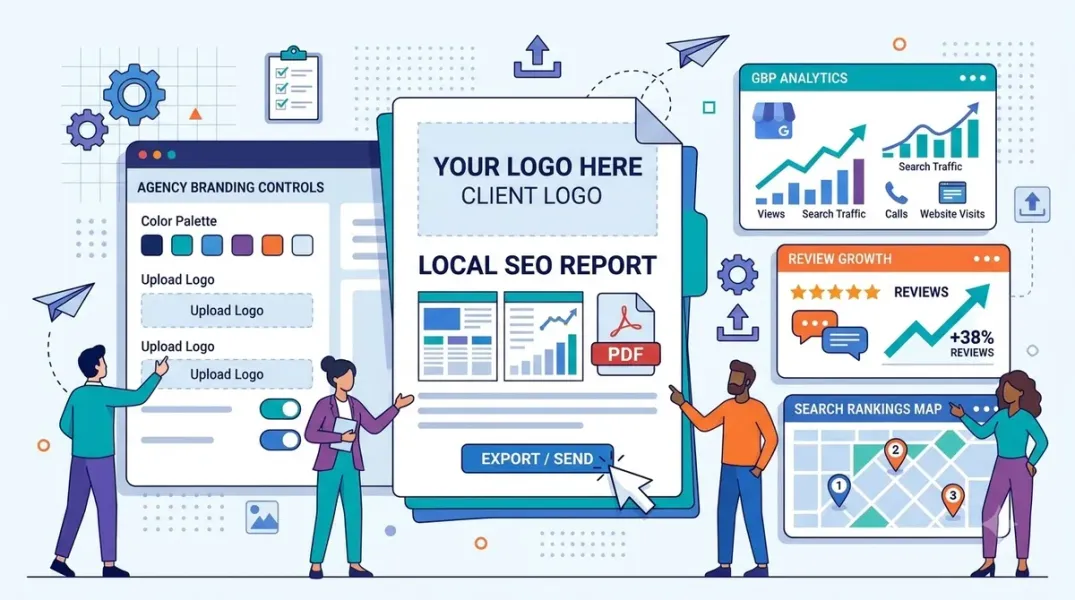
A high-retention report is not a data dump. It has four parts in priority order: an executive summary, conversion and revenue metrics, visibility and authority metrics, and proof of work—with analyst commentary tying it together.
The practical version of that structure, drawn from agency workflows that work, fits on four pages:
-
Executive summary. Two paragraphs no tool can write. One says what you did and why. One says what happens next month, including the thing you have decided not to do. This is what the client actually pays for.
-
Conversion and revenue metrics. The outcomes the client cares about: calls from Google, direction requests, website clicks, and form fills. If the client is a multi-location business, this is where the rollup lives, with only the locations that need a decision broken out separately.
-
Visibility and authority metrics. Keyword rankings for the terms that drive calls, local-pack and map-grid appearances, Google Business Profile views and searches, and new reviews plus average rating and response rate. Do not show 200 keywords; show the handful that matter and explain what changed.
-
Proof of work. The citations built or corrected, the posts published, the review responses sent, the photos added, the on-page fixes shipped. This section answers the “what did you do for the money” question before it is asked.
One structural upgrade is increasingly expected in 2026: AI visibility. BrightLocal’s research found that 45% of consumers have used AI tools like ChatGPT, Gemini, or Perplexity to find local businesses. Clients are starting to ask “do I show up in ChatGPT?”—and a report that answers it positions the agency a step ahead of competitors who cannot.
The Automation Workflow: From Four Hours to Ten Minutes
The manual version of a local SEO report is a spreadsheet, a screenshot folder, and a calendar reminder. Someone pulls the numbers in the same order every month, screenshots the map grid, counts reviews, and writes the two paragraphs that no tool can write. Agencies that report doing this manually describe 10 hours of work for a batch of client reports.
Automation removes the human from the middle. There are two routes, and most agencies end up using both.
Route 1 — Data lands in the template by itself. Connect the template to the data sources so the numbers populate on a schedule. The report builder handles the layout and branding; the analyst handles the commentary.
Route 2 — The tool builds the finished report and mails it. A reporting platform pulls from Google Business Profile, rank tracking, review feeds, and analytics, assembles the branded document, and sends it on a fixed cadence. DAXRM’s documented workflow is the model: on the first of every month, the report is generated automatically, white-labeled with the agency logo, and emailed to the client.
The workflow discipline that makes either route work is the same: agree the three questions the report answers, pick a delivery date that never moves, and build the template once so it is never edited again. The 7th and the 10th both work as delivery dates; what matters is consistency.
GrowthPro AI’s production math makes the difference concrete. For a 20-client agency, the manual version means 80 GBP posts written by hand and reports compiled by hand each month. The automated version runs the same 80 posts and generates the reports on a set schedule, with team time reduced to supervision only.
What “White Label” Actually Means (and Where Agencies Get Surprised)
The term covers three different levels, and the price gap between them is where agencies get caught out.
Level 1 — Cosmetic. Your logo and colors sit on a PDF or dashboard. You may or may not be able to remove the vendor’s “powered by” line.
Level 2 — Branded delivery. Reports open on your own domain (usually via a DNS CNAME record) and arrive from your own sender address.
Level 3 — Private-label portal. Clients log in to a workspace that carries only your brand, often with sub-accounts.
The practical check before you buy: ask whether the vendor’s branding can be removed from the client login, not just the PDF. A report that arrives under your logo but opens in a portal that says “Powered by [Vendor]” is quietly advertising the tool to a client who may start wondering why they need the middleman.
The 2026 Tool Landscape: Match the Tool to the Job
The market splits into all-in-one local SEO platforms, reporting-only tools, and free or open-source baselines. The right choice depends on whether the agency needs fulfillment, reporting, or both.
BrightLocal is the strongest fit for local SEO agencies that want fulfillment and reporting in one dashboard. It covers citation management, local rank tracking, GBP auditing, reputation monitoring, and white-label reporting, with pricing from $31/month on annual billing metered by location. Its white-label level is rated L1 with some domain-claim conflicts to verify. It is the pick if you manage multiple client locations and want bundled tools rather than a separate reporting subscription.
AgencyAnalytics is a reporting-first platform for multi-channel client reports, priced from $25/month (monthly billing) metered by client, with white-label levels listed between L2 and L3. It is the choice for agencies whose bottleneck is the report itself rather than fulfillment.
DashThis starts at 54/month metered by dashboards with L2 white-label on every plan. Swydo suits agencies with many clients and few accounts each, priced from €69/month metered by connected account with L3 white-label on a single plan. Whatagraph targets larger agencies with cross-channel data, starting around €699/month (annual) on a credit model.
Nightwatch combines rank tracking with AI prompt tracking and offers white-label from the Professional tier at €199/month. SE Ranking and Semrush add reporting to rank tracking for teams already inside those ecosystems, though their white-label depth varies by add-on.
GrowthPro AI is built specifically for agencies managing 10+ client locations, with automated GBP posting, review responses, rank tracking, citation monitoring, and auto-generated white-label reports covering rankings, review activity, GBP health, citation status, and AI visibility. Agencies buy at 50% of list price with white-label branding and reseller billing included.
Looker Studio is the free baseline, and it is worth naming honestly: white-label level is none on embeds, the watermark stays, and there is no native AI visibility tracking. It is a starting point, not a client-facing deliverable for a paid retainer.
For agencies that want a productized local SEO reporting offer without building the stack, blueprints now exist that package a white-label portal and automation at a service price point—one documented example sells at $450/month against a $119/month Growth plan, with the workspace and brand colors set up in the onboarding.
Five Mistakes That Turn a Report Into a Churn Risk
-
Building the report around what the tool can export. Export everything and you get 20 pages nobody opens. The client skims for two things: did we move, and what are you doing next.
-
Leading with vanity metrics. Domain authority and impressions do not answer the local client’s question. Lead with calls, directions, and bookings.
-
Sending a raw export with no branding and no narrative. The same data in a branded report is perceived as more valuable than a raw export, and that perception drives renewal decisions.
-
Letting the delivery date drift. A report that arrives “whenever someone remembered to send it” teaches the client that nobody is running a process.
-
Leaving the vendor’s logo in a screenshot. This is the most common quality-control failure and the fastest way to undermine the white-label premise.
Conclusion
A white-label local SEO report is not a formatting exercise. It is the artifact that makes the retainer legible. The agencies that retain clients are not necessarily producing better rankings—they are producing a report that answers the three questions every local client is silently asking: are we showing up, are people calling, and what did you do for the money.
The structure that works is consistent across the 2026 tooling landscape: an executive summary in plain English, conversion and revenue metrics, visibility and authority metrics for the handful of terms that matter, and proof of work—delivered on a fixed date, under your brand, at a white-label level that survives the client opening the login.
The automation exists to remove the assembly, not the judgment. BrightLocal users report cutting 10 hours of manual reporting to 10 minutes. GrowthPro AI’s agency clients reduce report building to supervision only. The hours saved should go into the two paragraphs that no tool can write—the ones that explain what changed and what happens next.
Call to Action
Audit your current report against the four-part structure this week. Open the last report you sent a client and check whether it contains an executive summary in plain English, the conversion metrics that map to revenue, visibility metrics for the terms that drive calls, and proof of work. If any section is missing, add it before the next delivery date. Then check your white-label level: can the client see the vendor’s brand anywhere in the login or the PDF? If they can, fix it or switch to a tool that reaches Level 2 or Level 3. Finally, write down the three questions your report answers and the delivery date that never moves—and automate the assembly so the only manual step left is the commentary.
FAQs
What is a white-label local SEO report?It is a client-facing performance report delivered under the agency’s own brand—logo, colors, domain, and sender address—while a third-party platform supplies the data connections and automation. The agency supplies the branding and the strategic commentary, and the vendor’s brand is not visible to the client.
What should a local SEO report include for a Google Business Profile client?At minimum: GBP performance metrics (profile views, searches, calls, direction requests, website clicks, photo views), local keyword rankings for the terms that drive calls, local-pack and map-grid visibility, reviews (new reviews, average rating, response rate), and proof of work (posts, citations, fixes). An executive summary and a next-month plan in plain English are what make the report readable.
How do I automate white-label local SEO reports?Connect the template to the data sources so numbers populate on a schedule, or use a reporting platform that assembles the branded document and sends it on a fixed cadence. DAXRM’s documented workflow generates the report automatically on the first of the month, white-labels it with the agency logo, and emails it to the client. GrowthPro AI generates reports on the agency’s schedule with no manual compilation.
Which tool is best for white-label local SEO reporting?It depends on the job. BrightLocal is the strongest all-in-one for local SEO agencies, from $31/month (annual)** metered by location. AgencyAnalytics is reporting-first from **$25/month metered by client. DashThis starts around 54/month with L2 white-label on every plan. GrowthPro AI is built for agencies managing 10+ locations with fulfillment and reporting in one platform, at 50% of list price for agency partners.
What is the difference between white-label levels L1, L2, and L3?L1 is cosmetic—your logo and colors on a PDF, and the vendor’s “powered by” line may remain. L2 is branded delivery—reports open on your own domain via CNAME and arrive from your own sender address. L3 is a private-label portal—clients log in to a workspace that carries only your brand, often with sub-accounts.
How do I reduce client churn with local SEO reports?Lead with progress and proof of work, not vanity metrics. The clients who cancel often had rankings that improved—they just did not know it, because the reporting was a screenshot pasted into an email with no narrative. A branded, structured report that answers “are we showing up, are people calling, and what did you do for the money” keeps clients patient while slow local SEO compounding happens.
Should I include AI search visibility in my local SEO report?Yes, increasingly. BrightLocal’s research found 45% of consumers have used AI tools to find local businesses, and clients are starting to ask whether they appear in ChatGPT or Google AI Overviews. Tools like Nightwatch and GrowthPro AI track AI visibility alongside traditional rankings, and adding that section positions the agency ahead of competitors who cannot report on it.
Internal & External Links
Internal links (to other posts in this series):
- How to Generate More Customer Feedback With Google Review QR Codes (previous post)
- How to Manage Google Business Profiles for Multiple Clients Without Account Chaos (next in series)
- How to Compare Local Marketing Performance Across Different Business Branches
- How to Track Review Response Rate and Response Time Across Your Locations
- How to Report Google Business Profile Calls, Clicks, and Directions to Clients
- Best Google Business Profile Management Software for Small Businesses in 2026
External links (sources referenced in this article):
- Vendasta — White-Label SEO Reports: The Complete Guide for Agencies in 2026: https://www.vendasta.com/blog/white-label-seo-reports/
- BrightLocal — Local SEO Tools for Agencies: https://www.brightlocal.com/agencies/
- Geotoolbox — Best White Label SEO Reporting Tools (2026): 10 Compared: https://geotoolbox.ai/blog/white-label-seo-reports
- Scepter Marketing — GoHighLevel GBP Dashboard: What to Include (and How to Deliver It White-Label): https://sceptermarketing.com/gohighlevel-gbp-dashboard/
- Local SEO Tool — How to Automate White Label Local SEO Reports: https://localseotool.co/how-to-automate-white-label-local-seo-reports/
- ScoutRival — White-Label Marketing Reports for Local SEO Agencies: https://scoutrival.com/blog/white-label-marketing-reports-for-local-seo-agencies/
- Reportr — Local SEO Reporting Checklist: What to Include for Clients (2026): https://reportr.agency/blog/local-seo-reporting-client-guide
- Flento — White-Label Local SEO Reporting for Agencies (2026): https://www.flento.io/blog/white-label-local-seo-reporting-agencies
- GrowthPro AI — White-Label Local SEO Platform for Agencies: https://growthproai.com/local-seo-for-agencies
- DashThis — SEO Reporting Tools: We Vetted 5 in 2026: https://dashthis.com
- The Stacc — 10 Best White Label SEO Tools for Agencies in 2026: https://thestacc.com
- InnovaAI — Clear Next Actions Local SEO Reporting Offer Blueprint: https://innovaai.io
How to Manage Google Business Profiles for Multiple Clients Without Account Chaos
Grow Your Google Maps Ranking on Autopilot
Stop spending hours every week manually replying to customer reviews and writing Google posts. Busirank automates your Google Business Profile to boost your local SEO rankings and turn searchers into paying clients.
 Busirank Team