 Busirank Team
Introduction
The problem with review monitoring is rarely the tool. It is the handoff. A review arrives at 10:15 AM. The store manager is on the floor. The marketing team is mid-campaign. Customer support does not know the review exists. By the time anyone notices it, hours or even days have passed, and the customer has already decided nobody is listening.
A Google review monitoring workflow closes that gap by making the right review reach the right person at the right time, without anyone remembering to check. It replaces “someone should look at the reviews” with a system that detects, routes, and escalates on its own.
For a busy team, the goal is not a dashboard that gets opened. It is a workflow that does not require opening one. This guide covers the components of that workflow, the alerts and routing rules that make it run, the tools that support it in 2026, and a template you can implement this week.
The Three Failures a Monitoring Workflow Must Prevent
Most review problems are not response-quality problems. They are attention-allocation problems, and they show up in three predictable forms.
The silent one-star. A negative review goes live, nobody sees it, and it sits at the top of the profile for a week. Google’s own guidance says a prompt response shows customers you value their feedback, and 91 percent of consumers say individual branch reviews shape how they see the whole brand. An unseen review is worse than an unanswered one, because it is invisible to the team and visible to every prospective customer.
The buried pattern. The same complaint appears at four locations, but no single person sees more than one instance, so it never gets treated as a systemic issue.
The missed ownership handoff. A review gets seen, but nobody is sure who should reply, so it sits in a shared inbox until it is stale.
A workflow that solves these three failures does not need to be complex. It needs alerts that fire, rules that assign, and targets that escalate.
Component 1: Detection That Runs on a Schedule, Not on Memory
The foundation is automated detection. The strongest pattern in the 2026 tooling is delta-based monitoring: instead of re-dumping the full review history every run, the system checks each location on a schedule and returns only the reviews that are new or changed since the last run, with state persisted between runs.
That design matters for cost and for attention. A team that receives a digest of seven new reviews across twelve locations will read it. A team that receives a full export of 1,400 historical reviews will not.
Detection should also handle review updates, not just new reviews. When a customer edits an existing review, the content may change from positive to negative or vice versa, and a reply written to the original text can become inaccurate. Workflows should trigger on both new and updated reviews, regenerating the draft when the underlying content changes.
The native route is viable at small scale. Google’s My Business Notifications API uses Cloud Pub/Sub to deliver notifications for new reviews, Q&As, and location updates, with NEW_REVIEW and UPDATED_REVIEW event types. It is the right foundation for a team with developer resources and a single account. For multi-location and agency setups, a scheduled actor or platform is the lower-effort path.
Component 2: Alerting on What Actually Requires Action
A monitoring workflow that alerts on everything trains the team to ignore it. The alerts that earn attention are the ones tied to a decision.
The 2026 alert taxonomy that appears across the tools is consistent, and it is worth adopting as a standard:
- New review alert — a location received any new review. Useful as a daily digest, not as a push notification.
- Negative review alert — a review at or below a threshold you set (default 3 stars in most tools) fires immediately to the location owner and the central reviewer.
- Rating-drop alert — a location’s overall average fell versus the previous run. This catches slow decline that no single review explains.
- Unanswered-review alert — a review has no owner reply after a defined window, triggering escalation.
The delivery channel matters as much as the alert. Notifications should land where the team already works—email, Slack, Discord, or a webhook that connects to the team’s existing tools. A monitoring tool that requires logging into another dashboard to see the alert has recreated the original problem.
A practical alert policy for a busy team: immediate push for 1–3 star reviews and rating drops; a daily digest for new positive reviews; a weekly digest for unanswered reviews older than 48 hours. Everything else is noise.
Component 3: Routing and Assignment
Detection without routing just moves the bottleneck. The review needs to reach a named person, not a shared inbox.
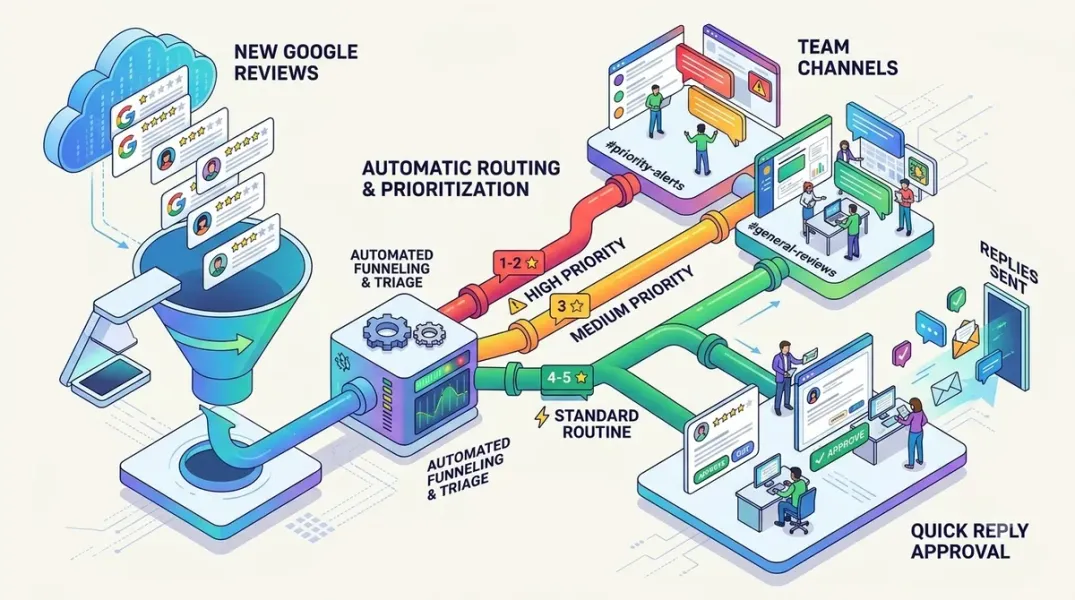
The routing logic that works is condition-based assignment: the workflow assigns the review to the right team member based on predefined conditions—location, star rating, theme, or keyword—and notifies them directly. In practice, that means a review from Location 7 goes to the manager responsible for Location 7, not to a central queue where it waits for triage.
For sensitive reviews, routing should be escalation-based, not visibility-based. A common and effective rule is to route anything at two stars or fewer to a manager automatically, so a sensitive reply never waits for someone to notice it. The healthcare and legal categories add a further rule: any review mentioning safety, legal, medical, or staff conduct routes to a designated escalation owner who decides whether the reply goes out at all.
The ownership model that scales is two-tier: a local owner per location who handles routine reviews, and a central reviewer who handles escalations, spots cross-location patterns, and audits samples. Zoho Publish’s automation layer supports this directly, with actions for Assign user, Notify user, and Create desk ticket triggered by the review event.
Component 4: The Ticket Bridge for Reviews That Are Not Just Reviews
A review that reports a service issue, billing problem, or product defect is not only a public-relations task. It is a support ticket that happens to have been filed in public. Treating it only as a reply task means the public response goes out while the internal issue stays open.
The workflow fix is to convert the review into a support ticket so the public reply and the internal resolution proceed together. Zoho Publish integrates this with Zoho Desk; other platforms support webhook or Zapier-style bridges. The operational benefit is that the team can track the issue to closure and then update the public reply if needed, rather than declaring victory when the response is posted.
Component 5: Response-Time Targets and Escalation
A monitoring workflow without a clock is a notification system. The target is what turns it into an operating standard.
The benchmark worth using is the 43-location dealership case study, where automating five-star replies and keeping humans on everything else cut the average response time to 6 to 16 hours across all locations. Consumer expectation supports the target: a meaningful share of customers expect a same-day or next-day reply, and Google’s guidance rewards responsiveness.
A workable SLA for a busy team:
- 1–3 star reviews: first human touch within 4 business hours; reply within 24 hours.
- 4–5 star reviews: auto-reply or one-click approval within 24 hours.
- Escalated (safety, legal, staff): acknowledgment within 4 hours, resolution path within 48 hours.
The escalation rule is the enforcement mechanism: if a review passes its SLA without action, the workflow notifies the approver’s backup, not just the original owner. Without that, the workflow depends on the same person who was already too busy to check the dashboard.
The Tools That Support This Workflow in 2026
The market splits into scheduled actors, review-management platforms, and inbox-style tools, and the right choice depends on whether you need a workflow engine, a reputation suite, or a shared queue.
Scheduled actors for delta monitoring. Apify’s Google Reviews Monitor checks many locations on a schedule, returns only new and changed reviews, flags low-star reviews, detects rating drops, surfaces unanswered reviews, and pushes alerts to Slack, Discord, or any webhook, with optional AI reply drafts on new reviews only. Pricing starts at $15.00 per 1,000 location checks. It is the lowest-friction way to add detection and alerting without a platform subscription.
Digest actors for multi-location oversight. Review Roll-up monitors reviews across many locations in one scheduled run and produces a single digest with alert levels, rating movement, and recurring complaint themes across every location, positioned as a fraction of per-location review-management pricing. Review Push provides daily monitoring across Google, Facebook, and Foursquare with a customized dashboard and automatic reports at the corporate, regional, district, and store levels.
Platforms for routing and reputation analytics. Zoho Publish is the clearest example of a workflow-first design, with automation triggers for new and updated reviews, assign user, notify user, and ticket creation, and notifications delivered by email and other channels. Cinquo is built for multi-location groups with KPIs and workflows aimed at Google Maps reputation. SmartSurvey’s Reputation Management connects Google Business and Trustpilot into one dashboard and uses AI tagging by sentiment and theme to show what is driving praise and complaints across locations.
Inbox tools for teams already living in a shared queue. Sked Social, RecurPost, and SleekFlow pull Google reviews into the same inbox that holds comments and messages, with labels, team assignment, internal notes, AI-drafted replies, and response-time reporting, so reviews do not pile up in one account manager’s queue.
Comparison context. The broader 2026 comparison landscape places Reviewflowz, Birdeye, Podium, Reputation.com, ReviewTrackers, BrightLocal, NiceJob, LocalClarity, and SOCi among the leading review-management platforms, with Birdeye and Podium priced at the premium end (400+ per month) and LocalClarity and BrightLocal at the accessible end. The right tier depends on whether the workflow needs to detect (actor), assign and report (platform), or sit inside an existing inbox (inbox tool).
A Workable Template for a Busy Team
The workflow that a small marketing team can actually maintain, stated as rules:
Detection: Scheduled check every 2–4 hours across every location, delta-only.
Alert policy: Immediate push for reviews at or below 3 stars and for rating drops; daily digest for new positive reviews; weekly digest for unanswered reviews older than 48 hours.
Routing: Star rating ≤ 3 → location owner plus central reviewer. Keyword match (safety, legal, medical, refund) → escalation owner immediately. Rating ≥ 4 → one-click approval queue.
Ticket bridge: Any review mentioning a service, billing, or product issue creates a support ticket linked to the review.
SLA and escalation: 4 business hours to first touch on negative reviews; 24 hours to reply; if the SLA passes, notify the backup owner.
Audit: Monthly sample of auto-handled replies checked against brand voice and accuracy.
That is a workflow, not a dashboard. It runs on scheduled detection, conditional routing, and a clock.
Conclusion
Building a Google review monitoring workflow for a busy team is a routing and alerting exercise, not a reporting exercise. The three failures to prevent are the silent one-star, the buried pattern, and the missed ownership handoff—and each is solved by a specific mechanism: delta-based scheduled detection, threshold and rating-drop alerts delivered where the team works, and condition-based assignment with an SLA and a backup owner.
The tools now support every part of this. Scheduled actors handle detection and alerting at low cost. Platforms like Zoho Publish add assignment, notification, and ticket creation. Inbox tools put reviews next to the other conversations the team is already handling. The 43-location case study shows what the assembled workflow produces: response times of 6 to 16 hours across every location, with several hours a week returned to the marketing team.
The remaining discipline is governance: alert only on what needs action, assign to a named person, set a clock, and audit the sample. A workflow that fires every alert at everyone is just a louder dashboard.
Call to Action
Write your alert policy and routing table before you choose a tool. List three tiers—negative (≤3 stars), positive (≥4 stars), and escalated (keyword-triggered)—and assign a named owner, a response-time target, and an escalation backup to each. Then pick the narrowest tool that supports that policy: a scheduled actor for detection and Slack/webhook alerts, a platform if you need assignment and ticket creation, or an inbox tool if your team already lives in a shared queue. Run it for two weeks, measure the time from review arrival to first human touch, and tighten the alert thresholds that produced noise. The workflow is working when nobody has to remember to check.
FAQs
What is a Google review monitoring workflow?It is the system that detects new and updated reviews, alerts the right person, assigns ownership, and escalates when a response is overdue. It differs from a review dashboard because it runs on scheduled detection and conditional routing rather than requiring someone to open a tool and look.
How often should a monitoring workflow check for new reviews?Every 2–4 hours is a practical cadence for a multi-location business, with immediate push alerts for reviews at or below the negative threshold. A daily digest is sufficient for positive reviews. The right frequency is the one that lets a negative review reach a human within the first-touch SLA.
What alerts should a busy team actually turn on?Three: negative review alerts (at or below a star threshold you set), rating-drop alerts (a location’s average fell versus the previous run), and unanswered-review alerts (no reply after a defined window). New-positive-review alerts should be a daily digest, not a push notification, or the team will start ignoring the channel.
How do I route reviews to the right person across multiple locations?Use condition-based assignment: route by location, star rating, theme, or keyword to a named owner, with a backup approver for SLA breaches. A common rule is to route anything at two stars or fewer to a manager automatically so a sensitive reply never waits for triage.
What is the best tool for a small team that does not want a full platform?A scheduled actor like Apify’s Google Reviews Monitor is the lowest-friction option: it checks many locations on a schedule, returns only new and changed reviews, and pushes alerts to Slack, Discord, or a webhook, starting at $15 per 1,000 location checks. Add an inbox tool if the team needs assignment and response tracking in the same place.
How fast should a team respond to a negative Google review?A workable SLA is first human touch within 4 business hours and a reply within 24 hours. The 43-location dealership case study maintains a 6 to 16 hour average response time across all locations after automating five-star replies and keeping humans on the rest.
Should a monitoring workflow turn reviews into support tickets?Yes, when the review reports a service, billing, or product issue. Converting the review into a ticket lets the public reply and the internal resolution proceed together, so the team tracks the issue to closure instead of declaring victory when the response posts.
Internal & External Links
Internal links (to other posts in this series):
- How to Identify Repeated Customer Complaints Across Multiple Store Locations (previous post)
- How to Create a Review Escalation Process for Unhappy Customers (next in series)
- How to Manage Google Reviews From Multiple Locations in One Dashboard
- How to Set Up Review Approval Workflows for Your Marketing Team
- How to Track Review Response Rate and Response Time Across Your Locations
- How to Use Review Sentiment Analysis to Discover Customer Pain Points
- Best Google Business Profile Management Software for Small Businesses in 2026
External links (sources referenced in this article):
- Apify — Google Reviews Monitor: Multi-Location Alerts & Reports: https://apify.com/dami_studio/google-reviews-monitor
- Vendasta — Multi-Location Review Management: How One Dealer Cut Review Response Time to Under 16 Hours Across 43 Locations: https://www.vendasta.com/blog/multi-location-review-management/
- Zoho Publish — How Zoho Publish helps you never miss a Google review again: https://www.zoho.com/publish/reputation-pulse/how-zoho-publish-helps-you-never-miss-a-google-review-again.html
- Google for Developers — Manage real-time notifications (Business Profile APIs): https://developers.google.com/my-business/content/notifications
- Search Engine Watch — Google review management tools I’d choose before buying a reputation suite: https://searchenginewatch.com/google-review-management-tools/
- Apify — Review Roll-up: Multi-Location Review Digest: https://apify.com/moganes/review-rollup
- Reviewflowz — Top 10 review monitoring software for 2026: https://www.reviewflowz.com/blog/review-monitoring-software
- SmartSurvey — Introducing Reputation Management: https://www.smartsurvey.co.uk/updates/introducing-reputation-management-your-google-and-trustpilot-reviews-alongside-your-survey-data
- Sked Social — Reputation management: Google reviews in one inbox: https://skedsocial.com
- RecurPost — Google Review Replies for Client Locations: https://recurpost.com
- SleekFlow — Google customer reviews integration: how it works: https://sleekflow.io
How to Create a Review Escalation Process for Unhappy Customers
Grow Your Google Maps Ranking on Autopilot
Stop spending hours every week manually replying to customer reviews and writing Google posts. Busirank automates your Google Business Profile to boost your local SEO rankings and turn searchers into paying clients.
 Busirank Team