 Busirank Team
Introduction
The fear is justified: you turn on AI review replies, and suddenly every response opens with “Thank you so much for your kind words! We’re thrilled you enjoyed your visit and hope to see you again soon!” Forty times in a row, under your business name, for every customer to see. The automation worked—but the brand disappeared.
That is the tension at the heart of automating Google review responses. The time savings are real, and for busy teams, they are necessary. A reply to every review signals an active, cared-for profile, and Google tends to favour profiles that look engaged. But a generic reply can do more damage than no reply at all, because it tells every future customer that nobody real is listening.
This guide is not about whether to automate. It is about how to automate without letting the machine write in a voice that is not yours. The answer sits in three levers: how you configure the AI, where you place human checkpoints, and how you build a voice reference the tool can actually follow.
Why Robotic Replies Happen (and Why It Is Not the AI’s Fault)
A robotic reply is not evidence that AI cannot write well. It is evidence that the AI was never given a voice to write in. The tell is sameness: the same opening every time, the same praise vocabulary (“thrilled”, “we appreciate your feedback”, “your satisfaction is our priority”), no specific detail from the review, and a response that could have been posted under any business on earth.
A reply that sounds human does three small things instead: it matches how the business actually talks, it names one real detail from the review (the dish, the occasion, the server, the wait), and then it stops—two to four sentences, no filler. That is exactly what AI is good at when you treat it as a first-draft writer rather than an autopilot.
The practical implication is that voice loss is a configuration problem, not an inevitability. Fix the inputs, and the output changes.
Lever 1: Give the AI a Voice Reference, Not a Vibe
The single highest-impact step is moving from vague tone instructions (“be friendly”) to a concrete brand voice reference. Modern tools support this directly. Birdeye’s Brand and Industry AI lets you define your brand voice by uploading a PDF, pasting a URL, or providing text; the system then detects personality traits and writing styles, with the option to manually adjust settings for precision. It also supports guardrails—explicit dos and don’ts for content generation—that prevent the AI from producing off-brand or non-compliant content, with built-in validation to stop prompt jailbreaking.
SoLikeAI takes a comparable approach, letting users adjust the AI to reflect business personality, style, and level of formality, and generating multiple context-based response options so a human can pick the one that fits. LocalReply AI uses a Brand Voice Memory feature that learns tone and style over time for consistency, alongside industry-specific templates for sectors like restaurants.
The takeaway: upload your actual marketing copy, your best manually written replies, and any brand guidelines document. The AI needs examples of your voice, not a description of it.
Lever 2: Use the Draft-First Method, Not Full Autopilot
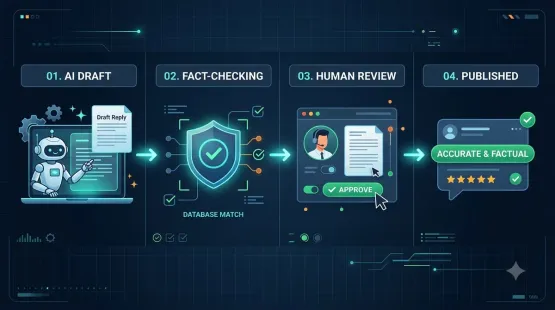
The draft-first method is the most reliable structure for preserving voice while still saving meaningful time. The AI reads the review and produces a draft in your tone; a human glances at it, changes a word or two, and posts. The AI saves you the blank page—it does not make the final call.
This is not a compromise; it is the recommended operating model from practitioners who have scaled it. PennyMac, a regulated mortgage lender, auto-posts AI replies on four- and five-star reviews but requires human approval for one- to three-star reviews: the agent drafts, a person approves, and the reply is already written by the time it reaches them. Their framing is instructive—“the agent doesn’t replace the brand voice, but it scales it”.
Even Google’s own AI reply feature in Google Business Profile is built around human review: owners can review, edit, and publish suggested responses from their account, and accounts differ on whether bulk AI replies still require manual approval before publishing. Treat the approval setting as something to verify, not assume.
A workable tiering for most small and mid-sized businesses:
- 4–5 star reviews with text: AI draft → auto-publish only if your guardrails are mature, otherwise one-click approve.
- 4–5 star reviews without text: AI draft → quick human approval (these are the ones where generic replies are most tempting and most detectable).
- 1–3 star reviews: AI draft → mandatory human edit and approval, every time.
- Reviews mentioning legal, safety, or medical issues: route to a human immediately; do not let automation touch them.
Lever 3: Build Guardrails That Reflect How You Actually Speak
Guardrails are where brand voice becomes operational. Birdeye’s implementation covers the core pattern: define what the AI must always do and must never do, and enforce those rules at the prompt-validation layer so they cannot be talked around.
For a small business, guardrails should be specific and concrete:
- Openings: “Never open with ‘Thank you for your kind words.’ Open with the customer’s name or a detail from the review.”
- Length: “Keep replies to two to four sentences.”
- Specificity: “Always reference one concrete detail from the review text.”
- Vocabulary: “Avoid ‘thrilled’, ‘valued feedback’, and ‘your satisfaction is our priority’.”
- Sign-offs: “Use the business name, not a generic signature.”
- Off-limits topics: “Never discuss refunds, legal matters, or employee names.”
These rules do the work that generic “friendly tone” instructions cannot. They also create a quality standard you can audit against later.
Lever 4: Rotate and Vary, Because Sameness Is the Real Enemy
Even a well-configured AI will produce recognisable patterns if it is asked to reply to dozens of similar reviews in one batch. The fix is built into some tools and workflows: generate several variants and select the one that fits best, rather than accepting the first output. Open-source and workflow-automation templates for this exist as well—n8n has a Google review reply workflow that uses AI to classify sentiment and draft on-brand public replies, with a setting to auto-post only after you trust the drafts. Dedicated skills and prompt kits now include batch modes that deliberately vary language across similar reviews to avoid templated-sounding output.
The principle: variety is a brand-voice feature, not a nice-to-have. If twenty customers get twenty identical thank-yous, the automation has failed even if every individual sentence is grammatically perfect.
The Tools That Support This Workflow
Birdeye is the most complete option for guardrail-driven brand voice, with voice upload, dos and don’ts, AI prompts, and real-time preview. It suits businesses that need central control across locations.
SoLikeAI is a browser-based option that works across Google, Booking, TripAdvisor, and Amazon, with customizable brand voice and multiple response suggestions per review; pricing is not listed on the extension page, so verify directly.
LocalReply AI adds a Brand Voice Memory and six industry-specific templates, making it a reasonable fit for restaurants and local service businesses.
Local Falcon offers AI-powered review replies with custom per-location response rules, so each reply can feel relevant and on-brand across multiple locations.
ReviewPilot generates AI-drafted replies within seconds while adhering to platform character limits and maintaining brand tone consistency—useful where brevity is enforced.
For teams that prefer to build rather than buy, n8n workflow templates connect sentiment classification and drafting to Google Business Profile, with manual approval as the default until trust is established. These are not plug-and-play products, but they give full control over the voice prompt and the approval gate.
Conclusion
Automating Google review responses without losing your brand voice is not a matter of finding a “better AI.” It is a matter of giving the AI a real voice reference, keeping a human at the decision point where it matters, and writing guardrails that are specific enough to enforce. The businesses that get this right treat AI as a first-draft writer with a strict style guide, not as an autopilot with a personality slider.
Start with the draft-first method on every review. Configure your voice reference and guardrails before you let anything publish automatically. Tier your approval rules by star rating and sensitivity. Then audit a sample of replies every month against the three tests of a human-sounding response: does it match how we talk, does it name something real from the review, and does it stop before it becomes filler? If it passes those tests, the automation is doing its job—and the brand is still yours.
Call to Action
Set up your first guardrail this week. Pick the three phrases your AI must never use and the one rule it must always follow (for example: “open with the customer’s name or a review detail”). Add those to your tool’s brand voice settings before you turn on any auto-publish function. If you are still choosing a tool, start with the draft-first method on a free or low-cost option and upgrade once you have a voice reference and guardrails that reliably produce replies you would have written yourself.
FAQs
Will automated review replies make my business sound generic?Only if the AI is given vague instructions. When you provide real examples of your writing, explicit guardrails, and a rule to reference a specific detail from each review, the output can sound like you. The robotic tone comes from sameness—repeated openings and generic praise vocabulary—not from automation itself.
Should I let AI auto-post replies to all reviews?Most practitioners recommend tiered approval. A common model is auto-posting on four- and five-star reviews while requiring human approval on one- to three-star reviews, where tone and accountability carry more risk. Google’s own AI reply feature is also built around review-before-publish, and approval settings vary by account.
What is the draft-first method?The AI writes a suggested reply in your configured tone, and a human reads, edits if needed, and publishes it. It preserves time savings (the blank page is gone) while keeping a person in control of the final voice. It is the recommended starting point before any auto-publish rules are enabled.
How do I teach an AI tool my brand voice?Upload a brand guidelines document, paste text from your website and marketing materials, or provide examples of review replies you have written manually. Tools like Birdeye support PDF, URL, or pasted-text voice definitions, and some can detect personality traits automatically before you refine them. A voice “memory” feature in tools like LocalReply AI learns from your usage over time.
What should my guardrails include?At minimum: banned opening phrases, banned vocabulary, a length limit (two to four sentences), a requirement to reference a specific review detail, and a list of off-limits topics (refunds, legal, employee names). Birdeye’s guardrail system lets you define dos and don’ts and enforces them at generation time.
Can I automate replies across multiple review platforms, not just Google?Yes. SoLikeAI supports Google, Booking, TripAdvisor, and Amazon from a single browser extension with a customizable brand voice. ReviewPilot focuses on Google Business Profile and Google Play Store with platform-specific character limits. If you manage multiple platforms, prioritise tools that let you define the voice once and apply it everywhere.
Internal & External Links
Internal links (to other posts in this series):
- Best Google Business Profile Management Software for Small Businesses in 2026 (previous post)
- AI Review Reply Generator vs Manual Responses: Which Workflow Saves More Time? (next in series)
- How to Create a Consistent AI Brand Voice for Every Business Location
- How to Set Up Review Approval Workflows for Your Marketing Team
- How to Build a Google Review Monitoring Workflow for Busy Teams
- How to Audit Your Team’s Review Responses for Quality and Consistency
External links (sources referenced in this article):
- Oddle — How to Reply to Google Reviews with AI, Not Like a Robot: https://www.oddle.co/my/blog/reply-to-google-reviews-with-ai
- Birdeye — Introducing Brand and Industry AI: https://birdeye.com/updates/introducing-brand-and-industry-ai/
- Birdeye — How mortgage and insurance brands keep control when AI answers reviews: https://birdeye.com/blog/regulated-brands-ai-reputation-trust/
- Location3 Media — Google’s New AI-Powered Review Response Feature: https://location3.com/blog/google-ai-powered-review-responses/
- SoLikeAI — Review Response & Reply Generator (Chrome Web Store): https://chromewebstore.google.com/detail/review-response-reply-gen/idmbheepbkdljeocinjlenpfmnpalfcb
- LocalReply AI — Review Response Generator (Chrome Web Store): https://chromewebstore.google.com/ (Brand Voice Memory and industry templates referenced in search result summary)
- n8n — Automate Google My Business responses with Gemini AI and Google Sheets tracking: https://n8n.io/workflows/ (template referenced in search results)
- Local Falcon — AI review reply knowledge base: https://www.localfalcon.com/
AI Review Reply Generator vs Manual Responses: Which Workflow Saves More Time?
Grow Your Google Maps Ranking on Autopilot
Stop spending hours every week manually replying to customer reviews and writing Google posts. Busirank automates your Google Business Profile to boost your local SEO rankings and turn searchers into paying clients.
 Busirank Team