 Busirank Team
Introduction
Only 15 percent of satisfied customers leave a review without being prompted—the other 85 percent enjoyed the experience and simply forgot by the time they got home. That is the friction problem in one sentence. The customer is happy, the intention exists, and the moment passes because searching for the business on Google and finding the review button is four steps too many.
A Google review QR code eliminates every one of those steps. The customer points their camera, taps the link, and lands on the review form with no searching, no typing, and no app to install. Done well, a single code on a counter, a receipt, or a table tent can add 5 to 15 reviews a month to a single-location business. Done poorly—wrong link, no context, printed too small—it is a square nobody scans.
This guide covers how to build the code correctly, the difference between Google’s native generator and third-party tools, the design and placement rules that actually produce scans, how to track performance, and the 2026 policy changes that make some older QR tactics grounds for a suspended profile.
Why the QR Code Works When the Verbal Ask Does Not
The verbal request fails for a predictable reason: timing. The best moment to ask for a review is when the experience is fresh, and the customer is standing in front of you. A QR code captures that moment on the spot. The link does the work; the ask just has to reach the customer at the right time.
The numbers support the mechanism. 76 percent of people who search for a local business on their phone visit within 24 hours, and the review window closes fast. A physical code at the point of satisfaction—the checkout counter, the table, the completed service call—reaches the customer before they leave, when the experience is still vivid.
The compounding effect is significant. Businesses that deploy review QR codes consistently report 2–3× more reviews than those relying on verbal requests alone, with some datasets showing an average 3× increase in monthly review volume. Reviews account for approximately 20 percent of local pack ranking factors, so every additional review is a direct input to search visibility.
Google’s Native Generator vs. Third-Party Tools
Google added a built-in QR code generator to Business Profile, and it is free and fast. Open a desktop browser, sign in to the account connected to the profile, find “Get more reviews” or “Ask for reviews,” and download the QR image. It takes under two minutes, and it requires no third-party subscription.
The limitation is what it does not do. The native code cannot be customized with your logo or brand colors, cannot track scan analytics, and cannot create different codes for different locations. Google also notes that QR-code generation is available on a computer browser, not on a phone.
Third-party generators fill those gaps. QR Code Generator (qr-code-generator.com) produces clean static codes with no account required. QRCode Monkey allows free logo overlays and color customization. Canva drops the code directly into a design workflow. Bitly combines a trackable short link with QR generation on a free tier. For most single-location businesses, the native code is sufficient. For multi-location brands, agencies, and anyone who needs scan data, a third-party tool with analytics is the practical upgrade.
Static vs. Dynamic: The Link Decision That Saves Reprints
The choice between a static and a dynamic QR code is the decision that determines whether you reprint your materials when the link changes.
A static code encodes the Google review URL directly. It is free, simple, and works forever as long as the destination stays live. The trade-off is that if the link changes—a new Place ID, a platform migration, a routing update—the printed code becomes dead. And dead codes are a measurable problem: the Uniqode State of QR Codes 2026 report found that 29 percent of consumers have encountered expired or dead QR links, 36 percent have experienced codes that did not scan properly, and 27 percent have hit slow-loading or broken experiences.
A dynamic code encodes a short redirect URL you control. The printed pattern stays the same; the destination changes in a dashboard. That is the right choice for anyone who might change the review link later, and it enables per-channel tracking by pointing different codes at different UTM-tagged redirects.
For a single-location business that is certain about its link, static is fine. For multi-location groups, agencies, and anyone printing in volume, dynamic is the safer default because it eliminates the reprint risk entirely.
Design Rules That Get Scans
A QR code without context is a random square. The design decisions that determine whether it gets scanned are consistent across every practitioner guide.
The headline does the asking. “Loved your visit? Tell us in 10 seconds” converts. “Scan me” does not. The copy should name the action directly: “Leave us a Google review” or “Scan to review”, with one trust line such as “Takes about a minute”. Avoid “Give us five stars” or prize-based language—Google’s 2026 policy treats incentivized or gated reviews as grounds for suspension.
Contrast and quiet zone matter more than logo placement. Dark modules on a light background scan most reliably. Keep a clean, blank margin (the quiet zone) around the pattern. Do not shrink the code below roughly 2.5 cm on printed cards. If you add a logo to the center, keep it modest and use high error correction—most modern scanners can read codes with up to 30 percent obstruction, but test before printing.
Print at 300 DPI minimum. Use SVG for professional printing because it scales without blur. Matte stock scans more reliably than glossy, and reflective surfaces and folds are common failure points.
Sizing by medium follows a simple rule: the further the scan distance, the larger the code.
- Business card: minimum 2.5 cm, recommended 3 cm.
- Receipt or invoice: minimum 2 cm, recommended 3 cm.
- A4 flyer: minimum 4 cm, recommended 5 cm.
- Table tent card: minimum 5 cm, recommended 7 cm.
- Window sticker: minimum 8 cm, recommended 10 cm.
Placement: Where Satisfaction Peaks
Placement determines whether the code becomes a review source or a decoration. The rule is to put it in front of customers at the moment they are most satisfied—not near the entrance, not in a cluttered window, not in a forgotten email three days later.
The conversion data clarifies the hierarchy. A QR code on paper (card or receipt) converts at 5 to 12 percent. A QR code on a QR stand converts at 15 to 28 percent because scanning is intuitive and happens at the right moment. SMS review links convert at 20 to 35 percent, and the combination of link plus QR produces up to 40 percent more reviews than one method alone.
The highest-performing placements by category:
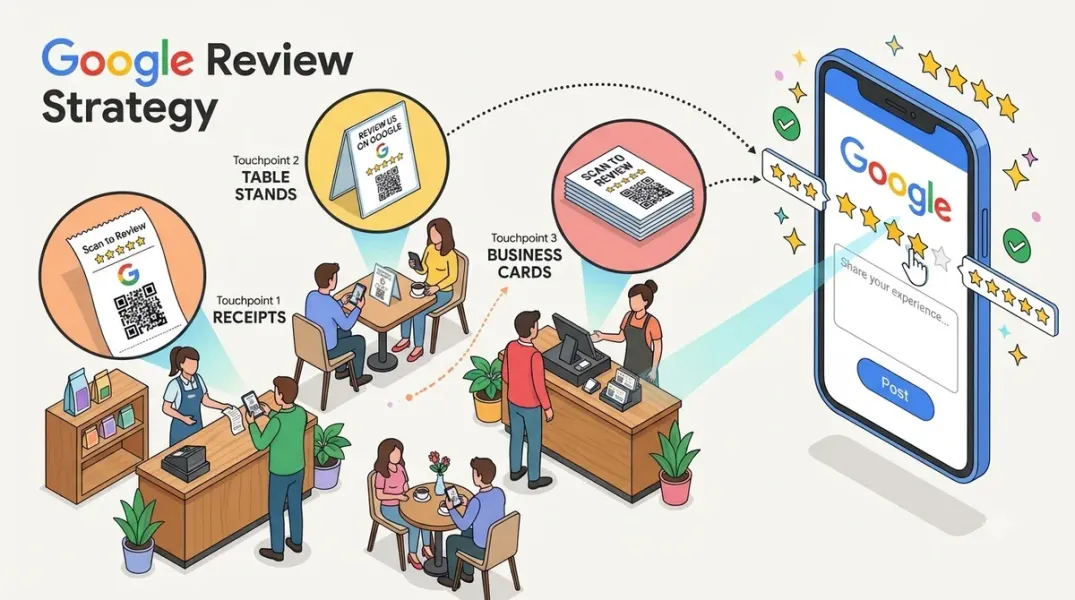
- Restaurants: table tents, receipt holders, behind the host stand.
- Retail: checkout counter, inside the bag, printed on the receipt.
- Service trades (HVAC, plumbing, electrical): technician business card handed at completion, sticker on the invoice.
- Healthcare and clinics: reception desk, post-treatment discharge paperwork.
One real-world data point is worth keeping in mind: a restaurant that placed a single fixed QR code at the front desk generated 1,349 scans in five months, against 84 scans for seven QR codes handed to staff. The lesson is not that staff handouts fail—it is that a visible, permanently placed code at a natural pause point outperforms a code that depends on someone remembering to hand it over.
Tracking: UTM Parameters and Scan Analytics
A code without tracking is a guess. The measurable setup uses a short link with UTM parameters that redirects to Google, so you can attribute reviews to the placement that produced them.
The standard pattern: ?utm_source=table_tent&utm_medium=qr&utm_campaign=reviews. Swap table_tent for receipt, counter, technician_card, or whatever the placement is. Over a month, you will know which placement actually produces scans and reviews, rather than assuming the counter is working because it is visible.
Paid QR tools add scan analytics—how many times the code was scanned, when, and from what device. Free tools generally do not. For a single location, the UTM data is usually enough. For multi-location brands, the scan-level analytics is what makes the dashboard worth the subscription.
NFC Cards: The Tap Alternative
A near-field communication (NFC) card does the same job as a QR code with one less step: the customer taps their phone against the card, and the review form opens without opening the camera app. Modern phones support both, so a combined QR + NFC card covers every customer.
The setup is identical to a QR code: test the review link first, encode it into both the QR pattern and the NFC tag, print a proof at final size, and test on multiple phones before ordering a batch. The one-time purchase model on NFC cards—no monthly fee—makes them a practical complement to printed QR materials rather than a replacement.
Real Results: What the Case Studies Show
The case-study evidence is specific and measurable, and it consistently points to volume and placement as the variables that matter.
Twisted Mac, a new restaurant in Plano, Texas, put a QR code on every table inviting every guest to leave an honest review. Within 90 days, it had 180+ Google reviews and a 4.9 average rating, ranking in top local results with zero ad spend on reviews.
Jackson Services, a garment services provider in Nebraska, was stuck below a 4.0 rating. It created 26 location-specific and driver-specific QR codes, gave drivers personalized collateral with their own code, and timed the requests at service touchpoints. The campaign generated 123 new reviews and lifted the average rating 22 percent, from 3.95 to 4.81, with an 8 percent increase in phone calls and direction requests.
A landscaping company in Salt Lake City went from 3 Google reviews a month to 22 by changing one thing: a small sticker at checkout reading “Scan to leave us a Google review.” No discount, no verbal pitch—just a direct link between a happy customer and the review form.
Common Mistakes and the 2026 Policy Rules
The failure modes are predictable. A code that points to a slow landing page loses the customer before the review form loads. A card with three QR codes, five social icons, and a paragraph of text gets fewer reviews because the customer does not know which action to take. A code printed too small, placed behind reflective plastic, or surrounded by a busy background fails at the physical stage even when the link is correct.
The policy rules are equally clear. Do not gate reviews—routing only happy customers to Google and filtering unhappy ones is against Google’s policy. Do not incentivize reviews with discounts or prizes. Do not ask for five stars specifically. These tactics are grounds for a suspended profile in 2026, and the risk is not worth the review volume.
The safe rule is to invite every customer to leave an honest review, with no sorting and no incentive. The Twisted Mac case study is the model: every guest is invited, happy or not, and the review goes directly to Google.
Conclusion
A Google review QR code is the lowest-friction review-generation tool a local business has. It removes the search step, the typing step, and the memory step, and it captures the customer at the moment satisfaction is highest.
The setup that produces results has four parts: get the link right and test it on iOS and Android, choose static for simplicity or dynamic for reprint safety, print at the correct size with dark-on-light contrast and a clear instruction, and place it where customers naturally pause—the counter, the table, the receipt, the invoice. Add UTM parameters so you know which placement works, and consider an NFC card for the customers who would rather tap than scan.
The evidence is consistent: 2–3× more reviews from QR deployment, 180+ reviews in 90 days for a restaurant that put a code on every table, and a 22 percent rating increase for a service business that gave every driver their own code. The code is not the strategy—the placement and the timing are. But the code is what makes the timing possible.
Call to Action
Create one working code today and place it where satisfaction peaks. Open your Google Business Profile on a desktop browser, find “Ask for reviews,” and either download the native QR code or copy the review link into a third-party generator. Test the link on both an iPhone and an Android phone before you print anything. Print one proof at final size, scan it in the actual location, and only then order the batch. Put the first code on the receipt or the counter—not near the entrance—and add a UTM parameter so you can see scans in your analytics. If you manage multiple locations or drivers, build a separate code for each one and track which placement produces reviews. The businesses that get results are not the ones with the most beautiful code; they are the ones that put a working code in front of the customer at the right moment.
FAQs
Does Google have a free QR code generator for reviews?Yes. Google added a native QR code feature to Business Profile in 2025. Sign in to the account connected to your profile on a desktop browser, find “Get more reviews” or “Ask for reviews,” and download the QR image. It is free and takes under two minutes, but it cannot be customized with a logo, cannot track scans, and cannot create separate codes for different locations.
Should I use a static or dynamic QR code for Google reviews?Use static if you are certain the review link will not change and you do not need scan analytics. Use dynamic if you might change the destination later, need per-placement tracking, or are printing in volume. Dynamic codes let you update the destination without reprinting, which eliminates the risk of dead codes after a link change.
Where should I place a Google review QR code for the most scans?Place it where customers naturally pause and satisfaction is highest: the checkout counter, the receipt, the table tent, or the invoice handed at completion—not near the entrance or in a cluttered window. A QR stand converts at 15 to 28 percent, while a code on paper converts at 5 to 12 percent, and a single visible front-desk code generated 1,349 scans in five months in one restaurant case.
How big should a review QR code be for print?Minimum sizes by medium: 2.5 cm for a business card, 2 cm for a receipt, 5 cm for a table tent, 8 cm for a window sticker, and 7 cm for an A3 poster. Print at 300 DPI minimum, use dark modules on a light background, keep a clean quiet zone around the pattern, and test the proof at final size before ordering a batch.
Is review gating allowed on Google?No. Routing only happy customers to Google and filtering unhappy ones is against Google’s policy, as is incentivizing reviews with discounts or prizes. The safe approach is to invite every customer to leave an honest review, with no sorting and no incentive. Violations are grounds for a suspended profile in 2026.
What is an NFC review card, and do I need one?An NFC card lets a customer tap their phone against the card to open the review form, without opening the camera app. A combined QR + NFC card covers every customer, and the NFC hardware is typically a one-time purchase with no subscription. The setup is the same: test the link, encode it into both the QR and the NFC tag, and test on multiple phones before ordering.
How many more reviews will a QR code actually generate?The reported range is 2–3× more reviews than verbal requests alone, with some datasets showing an average 3× increase in monthly review volume. Individual results depend on placement and volume: a single code on a counter can add 5–15 reviews a month for a single-location business, and a code on every table produced 180+ reviews in 90 days for one restaurant.
Internal & External Links
Internal links (to other posts in this series):
- How to Create a Review Escalation Process for Unhappy Customers (previous post)
- How to Create White-Label Local SEO Reports for Your Agency Clients (next in series)
- How to Build a Google Review Monitoring Workflow for Busy Teams
- How to Identify Repeated Customer Complaints Across Multiple Store Locations
- How to Automate Google Review Responses Without Losing Your Brand Voice
- Best Google Business Profile Management Software for Small Businesses in 2026
External links (sources referenced in this article):
- ReviewFire — Google Review QR Code: How to Create, Print, and Get Reviews: https://reviewfire.com/blog/google-review-qr-code
- Endorsa — QR Code for Google Reviews: How to Create and Use One (2026): https://endorsa.ca/qr-code-for-google-reviews
- Flento — How to Create a Google Review QR Code in 2026 (Free Guide): https://www.flento.io/blog/google-review-link-qr-code
- RecensioAI — Google Review Link or QR Code: Which Works Better for More Reviews?: https://recensioai.com/blog/google-review-link-or-qr-code-which-works-better-for-more-reviews
- QRshuffle — QR code for Google Reviews: the fast setup: https://qrshuffle.com/blog/qr-code-for-google-reviews
- Reviews Widget — Google Review QR Codes & NFC Cards: https://reviewswidget.app/blog/google-review-qr-codes-and-nfc-cards
- ProfileTap — Google Review QR Code — One Tap, No App: https://profiletap.io/in/google-review-qr-code
- Ampli5Pulse — How to Create a Google Review QR Code for Your Business: https://www.ampli5pulse.com/blog/google-review-qr-code.html
- QRZone.io — How Small Businesses Can Use QR Codes to Grow Revenue in 2026: https://www.qrzone.io/blog/qr-codes-for-small-business
- Hurrdat Marketing — How Jackson Services Achieved a 22% Rating Increase: https://hurrdatmarketing.com/digital-marketing-news/garment-service-review-generation/
- TenablyAI — Case Study: 180+ Google Reviews in 90 Days — Twisted Mac: https://www.tenablyai.com/case-study/twisted-mac
- Visu Network — Why Static Google Review QR Codes Underperform (2026): https://visu.network
This response is AI-generated, for reference only.
How to Create White-Label Local SEO Reports for Your Agency Clients
Grow Your Google Maps Ranking on Autopilot
Stop spending hours every week manually replying to customer reviews and writing Google posts. Busirank automates your Google Business Profile to boost your local SEO rankings and turn searchers into paying clients.
 Busirank Team