 Busirank Team
Introduction
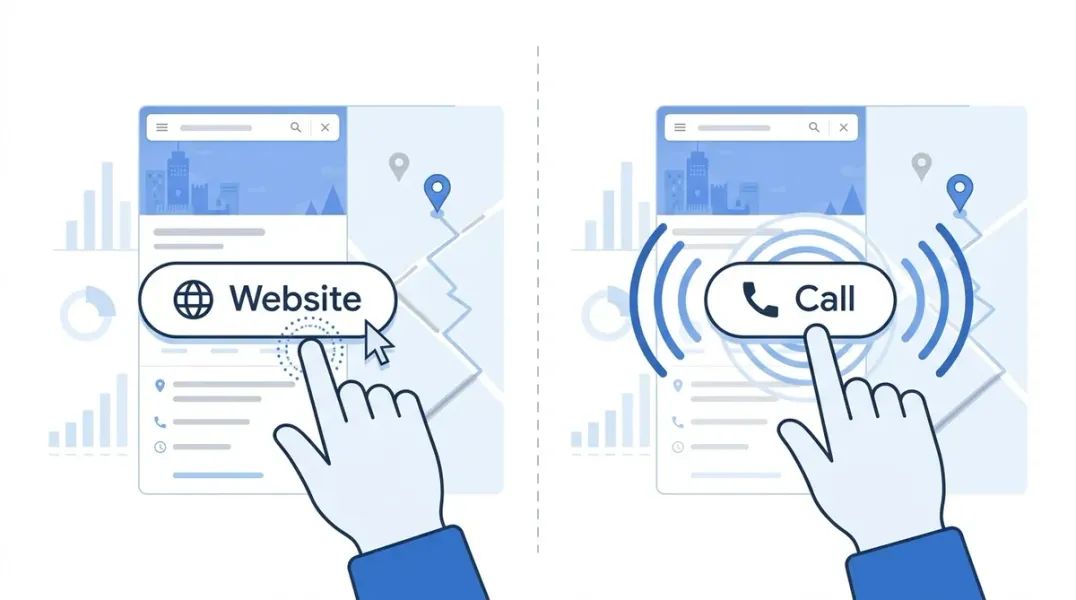
Every time someone taps your Google Business Profile, they make a choice. They can call you directly, visit your website, request directions, or send a message. Each action tells a different story about who that customer is and how close they are to buying.
The problem is that most business owners treat all GBP actions as the same. A click is a click. A call is a call. But the data shows something different. Customers who call from the Map Pack convert at 40% to 70%—sometimes higher—while website clicks and form fills often represent people still browsing, still comparing, still deciding .
Understanding the difference between clicks and calls is not just an academic exercise. It determines how you optimize your profile, where you focus your attention, and how you interpret your performance data. A profile with high website clicks but low calls is not necessarily failing. It may simply be attracting a different type of customer with a different stage of intent.
This guide breaks down what Google Maps clicks and calls actually measure, what they reveal about customer behavior, and how to use that knowledge to make better decisions for your local business.
Before interpreting behavior, you need to understand what the metrics actually count.
Website Clicks (ACTIONS_WEBSITE)
This metric counts the number of times someone clicked through to your website from your Google Business Profile . It does not tell you what happened after they arrived. They might have browsed, bounced, filled out a form, or called the number on your site—none of which Google tracks in this metric .
Phone Calls (ACTIONS_PHONE)
This metric counts clicks on the Call button within your Google Business Profile . Critically, it does not count whether the call connected, how long it lasted, or whether it became a customer . It is a click, not a conversation.
This distinction matters because business owners often look at their GBP call numbers and assume they represent actual phone conversations. They do not. A customer might tap the Call button, see the number, decide not to dial, and close the app. Google counts that as a call .
Directions
Direction requests measure how many people tapped the Directions button to navigate to your physical location . For storefront businesses, this is often a stronger signal than a call, because it indicates someone is actively en route .
What Calls Reveal About Buyer Intent
If website clicks are the browsing phase, calls are the decision phase. And the conversion data backs this up.
Calls from the Google Map Pack convert at 40% to 70% or higher, according to industry analysis . The reason is simple: when someone searches “[service] near me,” sees three options, and picks one to call, they are not browsing. They are deciding. Google has already done half the selling through your reviews, proximity, and Map Pack position .
This is why service businesses should prioritize call volume as their primary GBP metric. A med spa owner tracking daily calls reported that 10 calls per day correlated with $30,000 to $50,000 in monthly revenue, while 20 calls per day correlated with $80,000 to $120,000 . The exact numbers vary by industry and average ticket size, but the pattern holds: calls from GBP are high-intent leads.
The Map Pack position amplifies this effect. Businesses in the top three Map Pack positions capture roughly 75% of clicks on local searches, which converts to 15 to 22 calls per 100 searches. Positions 4 through 7 capture 20 clicks and 4 to 6 calls. Page two and beyond? Five clicks and maybe one call . Rank position is not just a vanity metric—it directly determines how many high-intent calls you receive.
What Clicks Reveal About Buyer Intent
Website clicks tell a different story. They indicate interest, but not necessarily readiness to buy.
A customer who clicks through to your website from the Map Pack is often still in research mode. They want to see your services, read testimonials, check pricing, or compare you against another business they found in the same search . This is not a bad lead—it is just a different stage of the buying journey.
The challenge with website clicks is that Google loses visibility after the click. Your GBP dashboard will record the click, but it cannot tell you whether that visitor called your office, filled out a form, or left without taking any action . To understand what happens after the click, you need to measure your website separately—through analytics, call tracking, or form submission tracking.
For some business types, website clicks are the primary conversion path. Professional services firms, B2B companies, and businesses with complex offerings often attract researchers who need detailed information before contacting anyone. For these businesses, a high website click volume with lower call volume is not a problem—it is a reflection of how their customers buy.
The Diagnostic Value of Comparing Clicks and Calls
The real insight comes from comparing clicks and calls together. The pattern between them reveals where your customer journey is breaking down.
High Calls, Low Clicks
Your profile is attracting ready-to-buy customers who want to talk immediately. This is common for emergency services, restaurants, and businesses with simple, urgent needs. Your optimization should focus on making the Call button prominent and ensuring your phone number is correct and answered promptly.
High Clicks, Low Calls
Your profile is attracting researchers, not buyers. This could mean several things: your website is the primary conversion path for your industry, your profile lacks compelling reasons to call immediately, or your Call button is not visible or functional. Check whether your call path works on mobile, review your website’s mobile experience, and ensure your phone number is easy to find .
High Views, Low Clicks and Calls
People are seeing your profile but not engaging. This suggests a visibility problem that is actually a relevance or trust problem. Your profile may be appearing for searches where you are not a strong match, or your reviews, photos, or business information are not compelling enough to drive action . Audit your categories, review volume, and photo quality.
High Directions, Low Calls and Clicks
For storefront businesses, this is often healthy. It means people are finding you and coming to you. The action that matters is the visit, not the call or click .
Why the Call Button Does Not Tell the Whole Story
There is a critical limitation to GBP call data that every business owner should understand: Google only counts clicks on the Call button within the profile. It does not count calls that happen through other paths .
A customer might see your profile, click through to your website, and call the number listed there. That call will not appear in your GBP dashboard . A desktop user might see your phone number and dial it manually without clicking anything. That call will not be counted either .
This means your actual call volume is almost certainly higher than what GBP reports. The question is how much higher. The only way to know is to compare GBP call data against your actual phone records, and to track calls that originate from your website separately .
Optimizing for Both Clicks and Calls
The most effective local businesses optimize for both actions. They make it easy to call for customers who are ready, and easy to click for customers who need more information.
For calls: Ensure your Call button appears on mobile (it is often hidden on desktop), your phone number is correct, and your hours are accurate. If you offer emergency service, make that visible in your description and attributes .
For clicks: Ensure your website is mobile-optimized, your landing page loads quickly, and your contact information is easy to find. The most common reason for high clicks but low conversions is a poor mobile experience after the click .
For both: Complete your profile, build reviews, and rank in the top three Map Pack positions. Position drives volume, and volume drives both clicks and calls .
Conclusion
Google Maps clicks and calls are not interchangeable metrics. They represent different customer behaviors, different stages of intent, and different conversion paths. Calls signal decision mode—customers who have seen their options and chosen you. Clicks signal consideration—customers who need more information before they commit.
The businesses that win at local search understand this distinction. They track both metrics, compare them against each other, and use the patterns to diagnose where their customer journey is working and where it is breaking. They do not panic when clicks are high and calls are low. They do not assume every call is a customer. They look at the whole picture.
Start by understanding what your numbers actually mean. Then optimize for the behaviors that matter most to your business type. The customers are already telling you how they want to engage. Your job is to listen.
Call to Action
Ready to understand what your Google Maps data is really telling you? Start by comparing your GBP call and click metrics over the last 30 days. Look for patterns. Check whether your Call button works on mobile.
Download our GBP Action Metrics Tracker to log clicks, calls, and directions over time and identify trends. Or contact our local SEO team to build a measurement framework that connects your profile activity to actual revenue.
FAQs
What is the difference between a Google Maps click and a call?
A click counts when someone taps through to your website from your Google Business Profile. A call counts when someone taps the Call button within the profile . Neither metric tells you what happened after the action—whether the website visitor converted or the call connected .
Why do calls from Google Maps convert better than website clicks?
Calls from the Map Pack represent decision-mode customers. They have already searched, seen their options, and chosen one to call. Website clicks often represent research-mode customers who are still comparing . That is why calls convert at 40% to 70% or higher.
Why does my GBP show calls when my phone never rang?
The call metric counts clicks on the Call button, not connected calls . A customer might tap the button, see the number, and decide not to dial. Google still counts that as a call.
Should I focus on getting more clicks or more calls?
It depends on your business type. Service businesses with urgent needs should prioritize calls. Businesses with complex offerings or longer sales cycles may benefit more from website clicks that lead to research and nurture . The best approach is to optimize for both and track them separately.
How do I track calls that come from my website instead of GBP?
You need separate tracking. Use call tracking numbers on your website, or review your phone records against GBP call data to identify gaps . GBP only counts clicks on the profile Call button, not calls from any other source.
Internal & External Links
Internal Links
- How to Optimize Google Business Profile for Voice Search (Topic 61)
- How Google Maps Reviews Influence Customer Buying Decisions (Topic 62)
- How to Track Phone Calls Generated by Local Search (Topic 70)
- Local SEO Attribution: How to Know Which Searches Generate Customers (Topic 72)
External Sources
- Google Business Profile APIs: Metric Reference: https://developers.google.com/my-business/reference/rest/v4/Metric
- Google Ads Help: Local Actions Conversions: https://support.google.com/google-ads/answer/9013908
- Local 3-Pack vs Organic Results: Where Should You Focus?: https://www.locafy.com/blog/local-3-pack-vs-organic
Grow Your Google Maps Ranking on Autopilot
Stop spending hours every week manually replying to customer reviews and writing Google posts. Busirank automates your Google Business Profile to boost your local SEO rankings and turn searchers into paying clients.

 Busirank Team
