 Busirank Team
Introduction
A suspended Google Business Profile can feel like a death sentence for a local business. Your listing vanishes from search and Maps, taking your reviews, photos, and customer traffic with it. For businesses that rely on local discovery, every day of suspension is lost revenue and lost trust.
The good news: most suspensions are reversible. The bad news: Google doesn’t make it easy. You get one shot at submitting evidence, and the window to do so is brutally short—just 60 minutes from the moment you open the evidence form .
This guide covers exactly what documents to prepare, how to organize them, and how to present a case that Google’s reviewers can approve quickly.
Before gathering evidence, confirm what you’re dealing with. Google suspends profiles for policy violations—things like keyword-stuffed business names, ineligible addresses, or misleading categories . The appeal process requires you to:
- Review the suspension reason in the appeals tool
- Correct any policy violations on your profile
- Submit an appeal with supporting evidence
- Wait for Google’s decision (typically 3–5 business days, though delays happen)
If your first appeal is denied, you can request an additional review. But the evidence you submit matters just as much the second time—and you’ll want to include everything you missed the first time .
The 60-Minute Evidence Window
This is the single most important logistical fact about Google’s appeal process: once you open the evidence form, you have 60 minutes to submit . If you miss the window, your evidence won’t be attached to your appeal.
What this means in practice: Prepare everything before you start the appeal. Have your documents scanned, labeled, and ready to upload. Don’t scramble to find a utility bill while the clock is ticking.
Core Evidence Documents
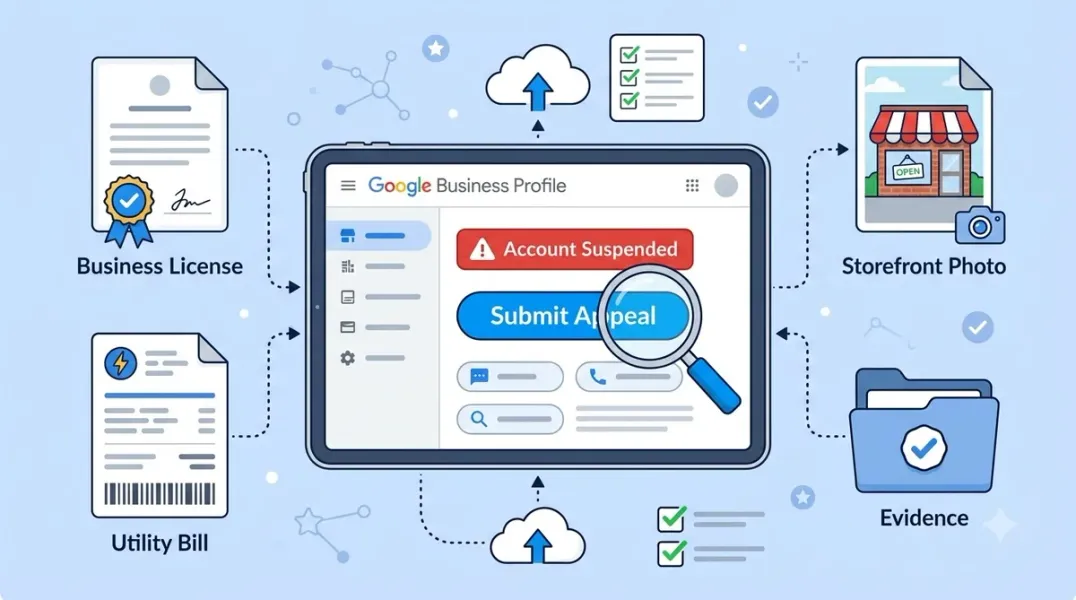
Google’s official guidance lists four categories of acceptable evidence. The critical requirement across all of them: the business name and address on the documents must match your Google Business Profile exactly .
1. Official Business Registration
This includes your LLC articles, incorporation certificate, or DBA filing. It should show your legal business name and registered address.
2. Business License
A local or state license for your industry or location. This is especially important for regulated industries like contractors, food service, or healthcare.
3. Tax Certificates
A recent tax document—federal, state, or local—that shows your business name and address.
4. Utility Bills
Electricity, phone, water, or internet bills in your business name at your business address . Personal bills are not sufficient, even if you work from home. The bill must be in your company’s name .
Additional Evidence Based on Business Type
Beyond the core documents, Google may consider additional evidence depending on your situation:
For storefront businesses:
- Photos of permanent signage outside your location showing your business name
- Photos of your storefront exterior and customer-facing interior
- A video walk-through showing your entrance, signage, and workspace
For service-area businesses:
- Photos of branded vehicles or equipment
- Photos of job sites (with customer permission)
- Documentation of your service area
For all businesses:
- Screenshots of your Business Profile (About, Contact, Location sections)
- A document containing your Business Profile ID, legal name, address, and any case IDs from previous Google communication
How to Organize Your Evidence
Google’s reviewers process thousands of appeals. Make their job easy:
Create a Google Drive folder and set sharing to “Anyone with the link can view” . This is the standard format Product Experts recommend for escalation.
Use clear file names. Instead of “IMG_4523.jpg,” use “Business-License-2025.pdf” or “Utility-Bill-January-2026.pdf.”
Include a summary document. Create a single PDF or Google Doc with:
- Legal business name
- Business address (even if hidden on your profile)
- Business Profile ID
- Case ID from previous Google communications
- Business website URL
- A brief explanation of any corrections you made
Blur sensitive information where possible (bank account numbers, personal details on utility bills), but keep the business name and address fully visible .
Common Evidence Mistakes to Avoid
Submitting personal utility bills. Google requires business utility bills in the company’s name. A home electricity bill won’t work, even if you operate from home .
Mismatched names. If your profile says “Smith’s Plumbing LLC” but your license says “John Smith Plumbing,” explain the discrepancy in your summary document. Don’t leave Google to guess .
Including irrelevant documents. More isn’t always better. Submit evidence that directly proves the business name, address, and legitimacy. Don’t upload customer contracts or unrelated paperwork.
Waiting too long. If your initial appeal was denied, submit your second appeal promptly. Prolonged suspension can cause your listing to be permanently removed or require starting over .
What Happens After You Submit
After submitting evidence, Google typically reviews within 3–5 business days . You can check the status in the appeals tool. If approved, your profile will be reinstated—often within hours. If denied, you can request an additional review, but you’ll need to address whatever the reviewer flagged.
Important: Don’t make additional edits to your profile while an appeal is pending. Changes can interrupt the review process and cause further delays.
Conclusion
A Google Business Profile suspension isn’t the end—but the reinstatement process demands preparation and precision. The 60-minute evidence window means you can’t afford to gather documents after you start the appeal.
The formula is straightforward: official business documents in your company’s name, matching your profile exactly, organized clearly, and submitted promptly. For service-area businesses, visual evidence of your operations matters. For storefronts, signage photos prove you exist where you say you do.
Prepare before you appeal. Match every detail. Submit within the window. That’s how you get your listing back.
Call to Action
Facing a suspension? Download our GBP Reinstatement Evidence Checklist—a printable guide that walks you through every document you need, organized by business type, so you’re ready before the 60-minute clock starts.
FAQs
Q: What if I don’t have a business utility bill in my company’s name? You can submit a lease agreement, business bank statement, or tax certificate instead. Google accepts multiple document types—just ensure the name and address match your profile .
Q: How long does the evidence submission take? The upload itself takes minutes. The 60-minute window is designed to give you time to attach files, not gather them. Prepare everything in advance.
Q: Can I submit evidence after the 60-minute window closes? No. Once the window closes, you cannot attach evidence to that appeal. You’ll need to wait for the decision and, if denied, submit a new appeal with evidence prepared.
Q: What if my appeal is denied and I have no more evidence to add? You can request additional review through the appeals tool. If denied again, escalate to a Google Product Expert for manual review . Persistent, well-documented cases can be resolved through escalation.
Q: Should I include photos of my home if I’m a home-based business? Only if your address is publicly displayed. If you’re a service-area business with a hidden address, focus on branded vehicles, equipment, and service documentation instead .
Internal & External Links
Internal Links
- [How to Handle Unauthorized Changes to Your Google Business Profile]
- [How to Manage Google Business Profiles After a Business Relocation]
- [Google Business Profile Ownership Disputes: How to Regain Control of a Listing]
External Sources
- Google Support: Fix suspended or disabled profiles
- Google Support: Appeal Business Profile content & profile restrictions
- Google Support: Guidelines for representing your business on Google
Grow Your Google Maps Ranking on Autopilot
Stop spending hours every week manually replying to customer reviews and writing Google posts. Busirank automates your Google Business Profile to boost your local SEO rankings and turn searchers into paying clients.

 Busirank Team
