 Busirank Team
Introduction
Every business managing a Google Business Profile eventually faces the same question: should we keep doing this manually, or should we automate?
The answer isn’t universal. A single-location restaurant updating holiday hours twice a year has no need for API integration. A franchise with 200 locations across 15 states updating menus, responding to thousands of reviews, and syncing hours with an internal scheduling system is drowning without it.
The real question isn’t which method is “better” in the abstract. It’s which method fits your scale, your team, and your operational reality. This guide breaks down the trade-offs honestly—capabilities, costs, constraints, and the decision criteria that actually matter.
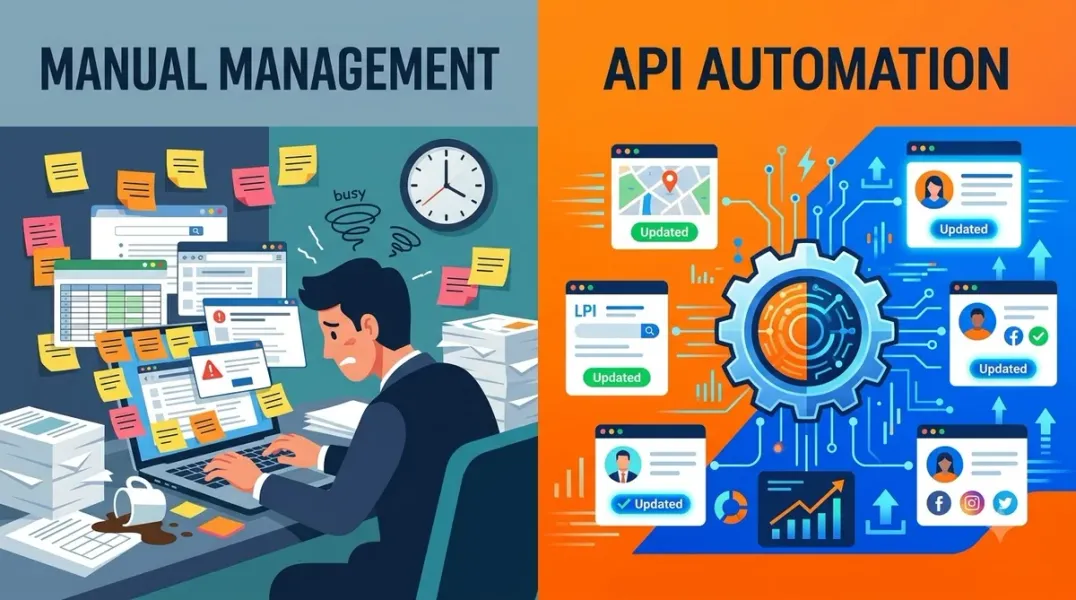
Manual management means logging into the Google Business Profile dashboard (or mobile app) and making changes one profile at a time. It’s direct, requires no technical setup, and works immediately.
API management means building or using software that communicates with Google’s servers programmatically. It requires OAuth credentials, a Google Cloud project, API access approval, and ongoing maintenance. The payoff is scale.
Neither is universally superior. The right choice depends on volume, frequency, and how your business operates.
What Manual Management Does Well
Immediate access with zero setup. Anyone with owner or manager permissions can edit a profile within minutes. No Cloud project, no OAuth flow, no approval wait.
Full access to every feature. The dashboard exposes features that the API may not yet support. When Google launches a new profile feature, it appears in the dashboard first—API support follows later, sometimes months behind.
Human judgment at every step. Writing a post, responding to a sensitive review, or adjusting a description requires nuance. Manual management keeps a person in the loop for every decision.
No maintenance burden. When Google changes API endpoints or deprecates methods, manual users notice nothing. API users must update their integrations.
What the API Does Well
Bulk operations at scale. Updating hours across 500 locations manually means 500 individual edits. Via API, it’s one programmatic call. The Business Information API supports updating location details, and default quotas allow 300 QPM with up to 10,000 location updates per day.
Review management automation. The Reviews API lets you read incoming reviews, draft responses, and post replies programmatically. For multi-location businesses processing hundreds of reviews weekly, this transforms review management from a bottleneck into a workflow.
System integration. If your internal systems (CRM, POS, property management) hold the source of truth for hours, addresses, or services, the API lets you sync changes automatically. Manual management requires someone to notice the change and remember to update Google separately.
Custom reporting. The Performance API pulls metrics into your own dashboards or data warehouse. Instead of checking Google’s interface for each location, you query everything in one place.
The Access Barrier
The API isn’t available to everyone who wants it. Google requires:
- A valid Google Cloud project
- A verified Business Profile active for 60+ days
- A valid business reason for access
- A business website matching your application
Before approval, your quota is 0 QPM—every call fails. After approval, projects typically receive 300 QPM per API.
The application review takes 7–10 business days officially, though actual timelines sometimes stretch longer. Common rejection reasons include vague use cases and applicants who don’t actually manage verified profiles.
Cost Comparison: Beyond the API
The API itself is free to use. But “free” doesn’t mean “no cost.”
Building directly: Development time for OAuth setup, error handling, rate limit management, and ongoing maintenance when Google deprecates endpoints. For a custom integration, this is weeks of engineering work.
Using a platform: SaaS tools that already have API access built in—like Flento, EmbedSocial, or Improvado—charge monthly fees but eliminate development overhead. You trade money for time and maintenance.
Staying manual: Your cost is human labor. For a few locations, it’s negligible. For dozens, it’s a part-time job.
The Decision Framework
Manual management is the right choice when:
- You manage fewer than 10 locations
- Your profile changes are infrequent and reactive (seasonal hours, occasional posts)
- You don’t need custom reporting or system integration
- You lack technical resources for API setup
API access is the right choice when:
- You manage 10+ locations
- You need to sync GBP data with another system (CRM, POS, ERP)
- You want to automate review responses across locations
- You’re building a product that includes GBP management
- You need custom reporting pulling GBP data into your own dashboards
A hybrid approach is often practical: use the dashboard for sensitive edits (review responses, urgent corrections) and the API for routine bulk operations (hours updates, post scheduling, performance data).
The Middle Path: API-Enabled Platforms
Most businesses don’t need to build direct API integrations. They need the benefits of automation without the engineering overhead.
Platforms like Flento, EmbedSocial, and Improvado have already built the API connections. You connect once via OAuth, and the platform handles quotas, error handling, and updates when Google changes endpoints. This is the pragmatic middle ground for agencies and multi-location brands that lack dedicated engineering teams.
Common Misconceptions
“API is always faster.” Not necessarily. Review responses posted via API sometimes take 15–60 minutes to appear publicly, while dashboard responses publish immediately. For urgent responses, manual may be faster.
“Manual doesn’t scale.” It doesn’t scale well, but a disciplined team can manage dozens of profiles manually with clear processes and user groups. The breaking point is usually review volume, not location count.
“API replaces the dashboard.” No. The API offers much of the same functionality, but it’s designed for programmatic management at scale. The dashboard remains the primary interface for most businesses, and some features arrive there first.
Conclusion
The Google Business Profile API and manual dashboard management aren’t competitors. They’re tools for different jobs.
Manual management wins on simplicity, access, and human judgment. It’s the right choice for small portfolios and infrequent updates. The API wins on scale, automation, and integration. It’s the right choice for multi-location operations and system-connected workflows.
The honest answer for most businesses falls somewhere in between: use the dashboard for the work that requires human attention, and use API-enabled platforms for the work that’s repetitive and high-volume. You get the best of both without building either from scratch.
The decision isn’t about which is objectively better. It’s about which fits how your business actually operates.
Call to Action
Deciding between API and manual management? Download our GBP Management Workflow Assessment—a decision matrix covering location count, update frequency, integration needs, and team capacity to help you choose the right approach.
FAQs
Q: Can I use the API without technical knowledge? Directly, no. But API-enabled platforms let you access API benefits through a user-friendly interface. You connect your Google account once, and the platform handles the technical work.
Q: Is manual management ever better than API for large accounts? For urgent, sensitive edits—like responding to a viral negative review—manual often wins because responses publish immediately. API responses can take 15–60 minutes to appear.
Q: What happens if I use the API without approval? Every call fails. Before Google approves your application, your quota is 0 QPM. You must complete the access request process, which typically takes 7–10 business days.
Q: Does the API cost money? The API itself is free to use. Costs come from development time, platform subscriptions, or the human labor required for manual management.
Q: Can I mix manual and API management? Yes, and many businesses do. Use the dashboard for sensitive, urgent, or feature-limited tasks, and the API (or API-enabled platform) for bulk updates, reporting, and review management at scale.
Internal & External Links
Internal Links
- [Google Business Profile API Explained: What Can Businesses Automate?]
- [How to Build a Google Business Profile Approval Workflow for Marketing Teams]
- [How to Evaluate Google Business Profile Management Software Before Switching Tools]
External Sources
- Google for Developers: Business Profile APIs Overview
- Google for Developers: Quota Limits
- Google Support: Use the Business Profile API
Grow Your Google Maps Ranking on Autopilot
Stop spending hours every week manually replying to customer reviews and writing Google posts. Busirank automates your Google Business Profile to boost your local SEO rankings and turn searchers into paying clients.

 Busirank Team
