 Busirank Team
Introduction
You are visible on Google Maps. Your profile has reviews, photos, and accurate hours. People are finding you. But they are not calling, not booking, and not walking through the door. The problem is rarely visibility alone—it is what happens between discovery and action.
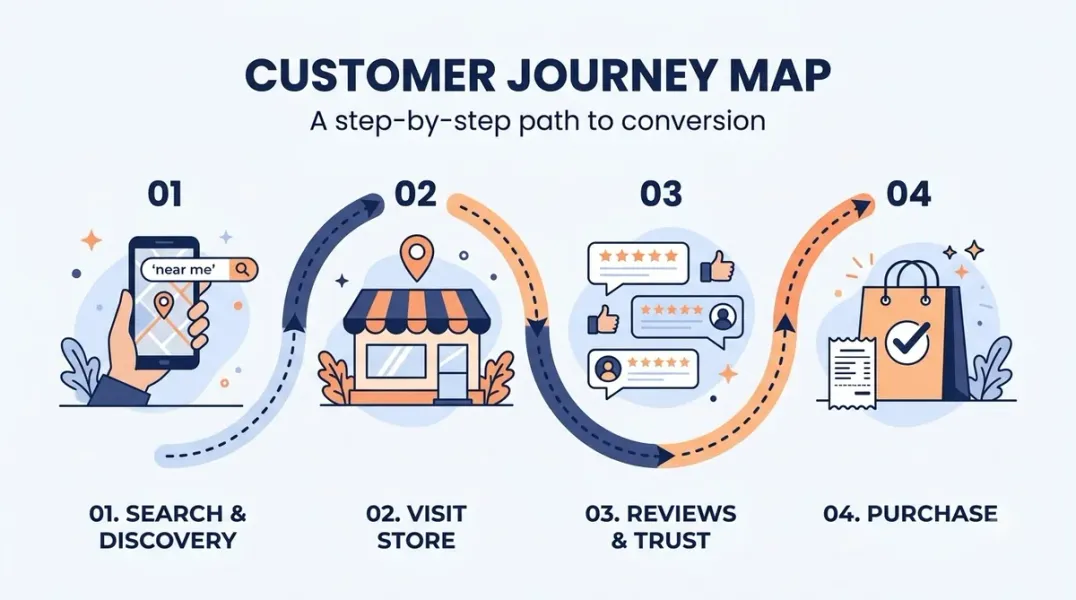
Local businesses often treat their marketing as isolated pieces: a Google Business Profile here, a website there, a review strategy somewhere else. The customer, however, experiences these as one connected journey. When one step is weak, the entire path breaks .
Customer journey mapping is the process of outlining every interaction a customer has with your business, from first search to repeat purchase . For local businesses, this map reveals exactly where potential customers drop off—and what to fix to turn more of them into paying customers.
The problem is not effort. It is disconnect. Journey mapping connects your marketing channels into one cohesive system, highlighting where small improvements could significantly increase conversion rates .
The financial stakes are real. Nearly seven out of ten online shopping carts are abandoned at checkout, and every friction point eliminated translates directly into revenue . For local businesses, the drop-off often happens even earlier—at the Google profile, the reviews section, or the moment someone tries to call.
The Five Stages of the Local Customer Journey A customer journey map for a local business typically includes five stages, each with its own touchpoints and potential failure points .
Awareness This is where customers first find you. For local businesses, this usually means a Google search, the Map Pack, or your Google Business Profile. Their question is simple: “Is this even for me?” .
The touchpoints here include your profile category, business name, star rating, and proximity. If you do not appear for the search, you never enter the conversation.
Consideration Once aware of your business, the customer compares you to competitors. They read reviews, evaluate your website, check photos, and look for signs of professionalism and credibility .
This is where trust is built or broken. Reviews that mention specific services, photos that show a real business, and clear service descriptions all matter here.
Decision At this stage, convenience becomes critical. The customer is asking: “Is the phone number easy to find? Does the website load quickly on mobile? Is pricing clear? Is scheduling simple?” .
Small friction points here—a slow-loading page, a confusing contact form, a booking link that does not work—can undo all the trust built earlier.
Experience After the purchase or service, communication and follow-up determine whether the relationship ends or continues. This includes confirmation messages, reminders, and the quality of the interaction itself .
Retention Repeat customers, referrals, and online reviews often generate the most profitable leads. Yet many businesses stop marketing once the sale is complete . The retention stage is where loyalty is built through follow-up emails, review requests, and reminders .
How to Map Your Customer Journey Creating a journey map starts with perspective. You need to see the experience through the customer’s eyes, not yours .
Step 1: Identify Your Primary Customer Type Do not try to map everyone at once. Choose your most valuable customer segment—the ones who spend the most, buy most frequently, or refer the most people .
A homeowner searching for emergency plumbing services behaves differently than someone planning a long-term renovation. Understanding intent shapes the path they take .
Step 2: List Every Touchpoint Walk through the journey from the customer’s perspective. Every interaction counts .
For a local business, these touchpoints may include: finding your business in Google search results, viewing your Google Business Profile, reading online reviews, visiting your website, calling directly from a mobile device, submitting a contact form, visiting your physical location, receiving follow-up communication, and leaving a review .
Step 3: Identify the Emotions This is what most businesses skip, and it is why their maps fail. At each touchpoint, what is the customer feeling? Frustrated because they cannot find pricing? Anxious about whether you will show up on time? Excited when they get a booking confirmation?
You cannot create positive experiences if you do not understand the emotional journey .
Step 4: Spot the Breaks Where does the customer get stuck? Where do they abandon ship? Common breaking points for local businesses include slow-loading mobile pages, confusing navigation, weak or outdated reviews, inconsistent messaging across platforms, and complicated contact forms .
One home service business had plenty of calls but no-shows were killing revenue. The journey map revealed the issue was not pricing or demand—it was a lack of confirmation and reminder messaging after booking. One simple touchpoint fixed it .
Where Local Businesses Usually Lose Customers Four common drop-off points appear repeatedly in local business journey maps .
Great Google Maps Visibility → Weak Website Messaging Someone finds you on Google, clicks through to your website, and cannot quickly understand what you do or why they should choose you. The profile did its job; the website failed.
Strong Service Offer → Confusing Next Step The customer wants what you offer but cannot figure out how to book, call, or inquire. The path from interest to action is unclear.
Phone Calls Answered → No Follow-Up A potential customer calls, gets information, and then never hears from you again. The initial contact happened; the conversion did not.
Happy Customers → Never Asked for a Review Satisfied customers are your best source of future business. If you do not ask them to leave a review, you lose the social proof that drives the next customer’s decision .
Turning Map Insights Into Conversions Mapping is only valuable if it leads to action. Once you have identified drop-off points, prioritize fixes based on two criteria: how much pain does it cause, and how easy is it to fix?
Start with high-pain, easy-fix issues. Quick wins build momentum .
Fix the Decision Stage First The decision stage is where the most revenue is lost. Ensure your phone number is prominent, your booking link works, your contact form is short, and your mobile pages load quickly .
Address the Retention Gap Most local businesses stop marketing after the sale. Add follow-up communication: confirmation messages, reminders, review requests, and check-ins. These touchpoints turn one-time customers into repeat customers and advocates .
Align Marketing Channels with Journey Stages Each channel should support a specific stage rather than operating independently. SEO and Google Business Profile support awareness. Website messaging and reviews strengthen consideration. Conversion optimization drives decisions. Email marketing and review strategies build loyalty .
Conclusion
Customer journey mapping for local businesses is not a theoretical exercise. It is a diagnostic tool that reveals exactly where potential customers drop off and what to fix. The five stages—awareness, consideration, decision, experience, and retention—each represent an opportunity to either lose a customer or convert them. When you map the journey, you stop guessing why leads do not convert and start intentionally fixing the friction points that cost you revenue.
Call to Action
Ready to stop losing customers between search and sale? Map your local customer journey today using the framework in this guide. If you need help identifying conversion gaps in your Google Business Profile and website, contact our local SEO team for a free consultation.
FAQs
1. What is customer journey mapping for a local business?
It is the process of outlining every interaction a customer has with your business, from first search to repeat purchase. For local businesses, this typically includes Google Business Profile views, reviews, website visits, calls, and in-person visits .
2. Where do local businesses usually lose the most customers?
The decision stage is the most common drop-off point. Issues include slow-loading mobile pages, unclear calls to action, complicated contact forms, and booking links that do not work .
3. How long does it take to create a customer journey map?
You can complete a basic map in about 90 minutes by picking one customer type, listing every touchpoint, identifying emotions at each stage, spotting breaks, and prioritizing fixes .
4. What tools do I need for journey mapping?
Start simple. A spreadsheet, sticky notes, or free tools like Miro or Google Drawings work well. The best journey map is the one you actually use, not the prettiest one gathering dust .
5. How does journey mapping improve conversions?
It reveals where customers drop off and why. By fixing friction points at each stage, you make it easier for more searchers to become callers, bookers, and repeat customers .
6. Should I map every customer type?
No. Start with your most valuable customer segment—the ones who spend the most, buy most frequently, or refer the most people. Focusing on one audience type captures more detailed insights .
Internal & External Links
- Internal Link: [How to Measure Appointment Conversion Rates From Local Search Traffic] (Topic #132)
- Internal Link: [How to Build a Lead Qualification Process for Customers Coming From Google Maps] (Topic #133)
- Internal Link: [Google Business Profile Booking Links: How to Help Customers Schedule Appointments] (Topic #117)
- External Link: Google Business Profile Help: Tips for Improving Your Local Ranking (official Google local search guidance)
- External Link: BrightLocal Local Consumer Review Survey (industry research on local consumer behavior)
Grow Your Google Maps Ranking on Autopilot
Stop spending hours every week manually replying to customer reviews and writing Google posts. Busirank automates your Google Business Profile to boost your local SEO rankings and turn searchers into paying clients.

 Busirank Team
